Paperclip Alternatives: Choose by the Work You Need to Do
A Paperclip alternative should make the work you already have easier to finish. For one person working in a repository, start with Claude Code or Codex directly. For colleagues who need to question a result together with their agents, bring the conversation into Alook.
We compare eight Paperclip alternatives in four groups:
- Direct agents: Claude Code, Codex, and Hermes Agent.
- Coding workspaces: Multica, herdr, and Paseo.
- Knowledge workspace: Cabinet.
- People and agents together: Alook.
The Paperclip in this article is paperclipai/paperclip, the open-source system that organizes agents into a company with roles, tasks, budgets, and approvals.
A company is too much machinery for a task you haven’t made clear yet. Our starting point is the job: who owns it, what they need, and what counts as done. An organization earns its place once those jobs need lasting coordination.
Paperclip alternatives at a glance
These eight alternatives fall into four groups: direct agents, coding workspaces, a knowledge workspace, and a shared conversation for people and agents.
If you’re building your own orchestration system with frameworks such as CrewAI or LangGraph, our AI agent collaboration platforms guide compares that category alongside workflow tools and shared platforms.
Start with the row that describes your unfinished work. A terminal workspace can help you find a blocked coding agent. A shared conversation can help a colleague explain why a proposed change misses the brief.
When to keep Paperclip
Keep Paperclip if you need an organization that continues working across many assigned jobs. A standing research role, a development role, and someone responsible for reviewing their output create coordination work even when you’re away. You need to know which agent owns the next brief, who approves a new hire, and how much the team has spent.
Paperclip puts those concerns in one place. Its current team catalog also offers starter teams, so building an organization doesn’t have to begin with an empty chart. Human teammates can manage assigned work in the same company, and its experimental Agent Chat adds direct conversations with agents.
That matters when comparing alternatives. “Paperclip has no chat” is an outdated reason to leave. Choose around how you spend your day: overseeing assigned work across an organization, working in a coding session, developing research, or discussing results with colleagues.
If budgets, approvals, and durable task ownership are the reason you chose Paperclip, improve that setup first. Removing the company layer also removes the place where you chose to manage those responsibilities.
Why look for a Paperclip alternative?
Running isn’t progress. The frustrating moment is easy to recognize: agents are still planning, retrying, or passing work along, token use keeps climbing, and there’s no new result you can review. Another agent is another handoff. When nobody can name the next reviewable result, adding one makes the confusion larger.
Start by finding the next concrete deliverable. Is someone supposed to produce a patch, a research brief, or a decision? Who can judge whether it is ready? A smaller assignment with one owner makes it easier to see where execution stops.
Another reason to reconsider is the amount of administration around small jobs. If fixing one bug means adjusting roles, moving assignments, and repeatedly restarting work, the organization may be larger than the problem. For a task you can describe and review yourself, direct access to the agent can be enough.
Then there’s the human relay. A researcher has the sources, a developer has the repository, and one person keeps moving explanations between them. The agents may each be doing useful work, but every correction still passes through that person. The fix is shared material or a shared conversation.
These situations lead to the four groups below. Choose the one that removes the specific delay you can point to.
Direct agents for solo coding and recurring work
Claude Code and Codex for solo coding tasks
For one person and one repository, our starting recommendation is simple: give your existing coding agent a clear job before building a company around it.
Give Claude Code or Codex a reproducible bug and the expected behavior. The agent investigates the relevant code and proposes a patch; you review the diff and the checks. That’s a short path from the problem to something you can judge.
You can add delegation when there is a separate job worth assigning. Claude Code, for example, has experimental agent teams for work that benefits from distinct contexts and coordination. For sequential changes to the same files, one session keeps the work together. Agent teams earn their place when the jobs can actually progress separately.
The choice between these two tools depends on your development workflow. Our Claude Code vs. Codex comparison covers that decision. If the harder question is how colleagues using both tools can work together, see Claude Code and Codex on the same team.
Hermes Agent for recurring research and operations
A recurring job doesn’t always need several roles. A daily research brief might need one agent, a defined set of sources, reusable instructions, and a schedule.
The daily brief needs a reliable worker before it needs a manager. That’s why we’d start with Hermes Agent: reusable instructions in skills, tools to gather the material, and a schedule for the next run. A brief that comes back too broad gives you a specific instruction to fix with that worker. Splitting the same small job across a researcher, writer, and reviewer creates three assignments to repair.
Hermes and Paperclip can also work together: Hermes can be a worker inside a Paperclip organization. Choose direct Hermes when the recurring job has one clear owner. Keep the coordination layer when several owners need to exchange work, follow approvals, and report progress over time.
Coding workspaces for parallel agents and code review
A busy dashboard doesn’t tell you whether a patch is ready. For coding work, we care about the path from the assignment to the diff and the person reviewing it. The next three tools make sense at different points along that path.
Multica for issue assignment and review
Multica organizes coding work around issues and agent execution. A team can assign a task, follow progress and blockers, and review the resulting work. It belongs on the shortlist for a team whose day already runs through an issue queue.
A reviewer needs the original assignment and the blockers behind a change, not just a finished diff. We prefer an issue-centered workspace like Multica when that trail matters more than watching every terminal. If you already review directly in your CLI and repository, another task board adds little.
herdr for managing agent terminal sessions
Sometimes the agents already work well. The problem is finding the right terminal among all the ones you opened.
herdr focuses on managing agent terminal sessions, including visibility into whether an agent is working, blocked, or idle. Its background terminal server keeps sessions running on the development machine when a client detaches or an SSH connection drops. That’s useful when your day involves checking several running jobs and intervening where a question is waiting.
We’d choose herdr when better visibility solves most of the pain. You keep the CLI workflow you know and improve how you supervise it.
Paseo for worktrees and desktop-to-phone access
Paseo connects a local daemon to interfaces you can use from desktop or phone. It brings together agent sessions, separate worktrees, file access, diffs, and pull request workflows around your development machine.
For parallel coding, a separate working copy is more valuable than another title on an org chart. Worktrees give each job room to change files. Phone access solves a smaller but familiar problem: the agent needs an answer and you’re away from your desk. That’s where Paseo’s design pays off.
With your agent CLIs installed and authenticated on the development machine, Paseo is our pick when worktree isolation or phone access solves a daily annoyance. If every task stays in one session at your desk, its extra ways to connect matter less.
Cabinet for reusable research and team knowledge
If every new assignment begins with “where did we put last week’s sources?”, more workers will inherit the same search problem.
Cabinet centers work on Markdown files stored on disk, with Git history and agent tasks around them. It also includes skills, scheduled jobs, and chat. The files stay available for you to edit and reuse.
A completed research task is a poor stopping point for the evidence behind it. Next week’s narrower comparison needs those sources and the reasons for last week’s decision. We want the next agent to start from that material, with a person able to correct the files. Cabinet’s document-centered approach fits that job better than treating the brief as a closed ticket.
A task board can tell you that research is complete. A knowledge workspace helps the next job begin from the research itself.
Alook for people and agents working together
We built Alook for multi agent collaboration because passing messages between people and agents shouldn’t become someone’s full-time job.
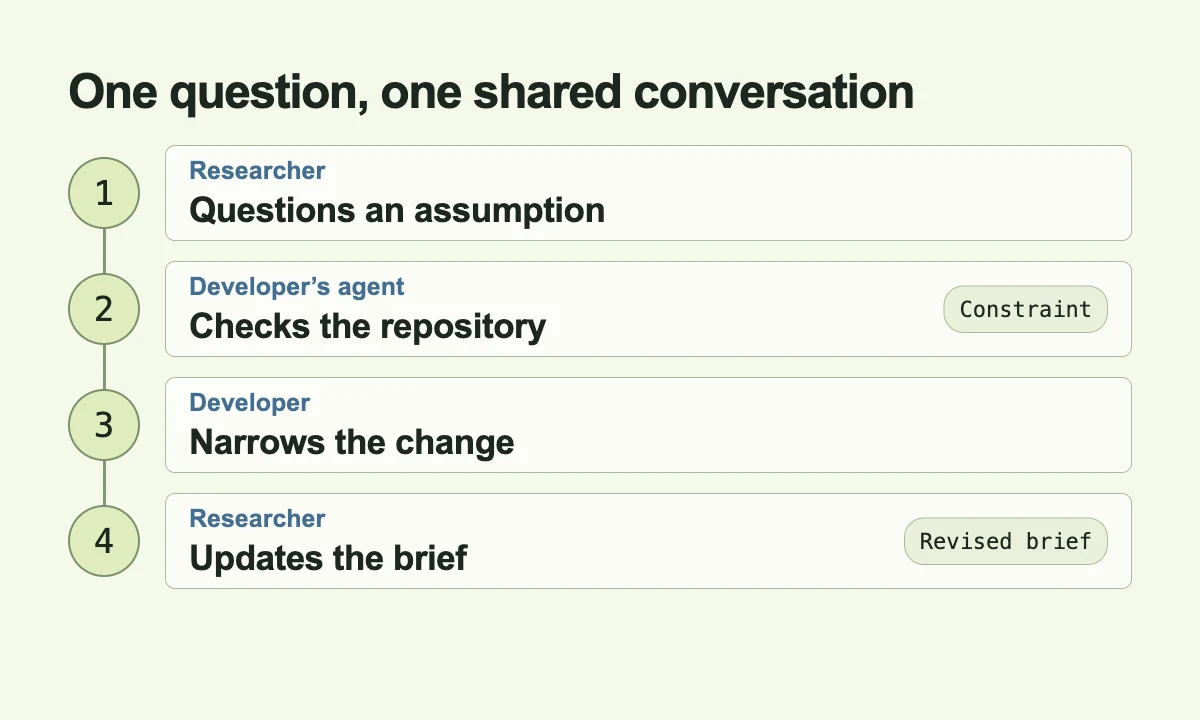
Suppose a researcher and a developer are reviewing a proposed feature. The researcher brings an agent that can examine the evidence. The developer brings a coding agent that can inspect the repository. When the researcher questions an assumption, both the developer and the relevant agent need that question. When the implementation reveals a constraint, the researcher needs to see it before the brief moves forward.
In Alook, the researcher can ask the developer’s agent to check that assumption against the repository in the same conversation. The agent answers with the constraint it finds. The developer proposes a smaller change, and the researcher updates the brief against that answer. Nobody needs to copy the question into a private coding session and carry the reply back for everyone else.
People can continue using their existing Claude Code, Cursor, or Codex setup. A connected machine runs the local agent, so it needs to be online when that agent works.
Alook is our pick when the researcher, developer, and their agents need to reach a decision together. For a hierarchy of autonomous roles with budgets and approvals, start with Paperclip.
Moving one job out of Paperclip
Moving the whole company is the wrong first test. One coding issue, recurring brief, or shared review will tell you whether the new tool fixes the delay that sent you looking.
“Continue the project” asks the new agent to reconstruct too much. “Review this diff against these three requirements” gives it a clear result to produce. The current material, earlier decisions, and a named owner make that assignment understandable. If you can’t explain the next job without rebuilding the whole company, the handoff itself needs more thought.
Rules and skills deserve the same attention. A file sitting in a folder only helps if the agent actually receives or loads it. For a recurring brief, one setup also needs to own the schedule. Once the new owner takes over, the old schedule should stop so two agents don’t independently produce competing versions of the same work.
The first result tells you whether the move helped: the blocked session is visible, the reviewer has the assignment beside the patch, or your colleague gets an answer directly from the agent. That’s a reason to keep the new workflow. Leaving Paperclip doesn’t have to mean finding another company to run.
Paperclip alternatives FAQ
What is the simplest Paperclip alternative for one person?
Use the agent you already have for a single, clearly defined task. For coding, start with Claude Code or Codex. For a recurring research or operations job with one clear owner, start with Hermes. Add a workspace when you can name the extra coordination you need.
What happens to budgets and approvals after leaving Paperclip?
Re-establish them in the destination tool and the services that run your agents. Check who can start work, which actions need approval, and where spending is limited and recorded. A coding workspace or shared conversation doesn’t automatically carry over Paperclip’s controls. If those controls are essential to operating your team, keep Paperclip responsible for them.