Claude Code vs Codex (2026): Features, Pricing, and Performance
The agent says the fix is ready. The tests pass. You read the changed files twice and still hesitate to accept the change.
You still need to understand the diff, ask for a correction, and wait for the next version. When a small fix takes three attempts, the way Claude Code or Codex handles that back-and-forth matters as much as its first answer.
Claude Code vs Codex: Desktop, CLI, IDE, and Cloud
If you are new to terminal tools, start with the Code tab in Claude Desktop or Codex in the ChatGPT desktop app. Use the CLI or an IDE extension if you already prefer working there.
The desktop apps keep the conversation and file changes together. The CLI runs in your terminal; an IDE extension puts the agent in your code editor. A diff shows added and removed lines in a patch, the set of changes you are reviewing.
A cloud environment needs its own repository files and dependencies; your laptop's uncommitted edits do not appear there automatically.
We use both desktop apps and keep Ghostty, a terminal app, for commands. If you want manual edits, Tab suggestions, and an agent in one editor, our Cursor vs Claude Code comparison covers that choice.
Permissions and Sandboxing in Claude Code and Codex
Will it change files without asking? Claude Code's Manual mode asks before file edits and most commands, except actions you have already allowed. Codex's Ask for approval still lets it edit files and run commands inside the workspace; it asks before crossing that boundary.
From Claude Code v2.1.283, interactive terminal and VS Code sessions start in auto mode, with another AI model reviewing actions in the background. Its default checks target operations such as force pushes and git reset --hard, which can discard work.
Codex's local workspace-write sandbox allows edits and commands in the project, keeps command-network access off by default, and protects .git as read-only. This protects the repository's Git data, not every working file: code in the project can still be changed or deleted. Hosted search and connected tools have separate network controls.
Saved settings and organization policy can change those starting modes. Codex's launch rules call the workspace-write preset Auto and recommend it for Git folders, with read-only for non-Git folders. In the desktop app, the corresponding workspace boundary is shown as Ask for approval. Codex's Auto preset describes file access and approval boundaries; Claude's auto mode uses an AI reviewer.
A sandbox restricts which files and network resources a command can reach. Approval decides whether an action may proceed.
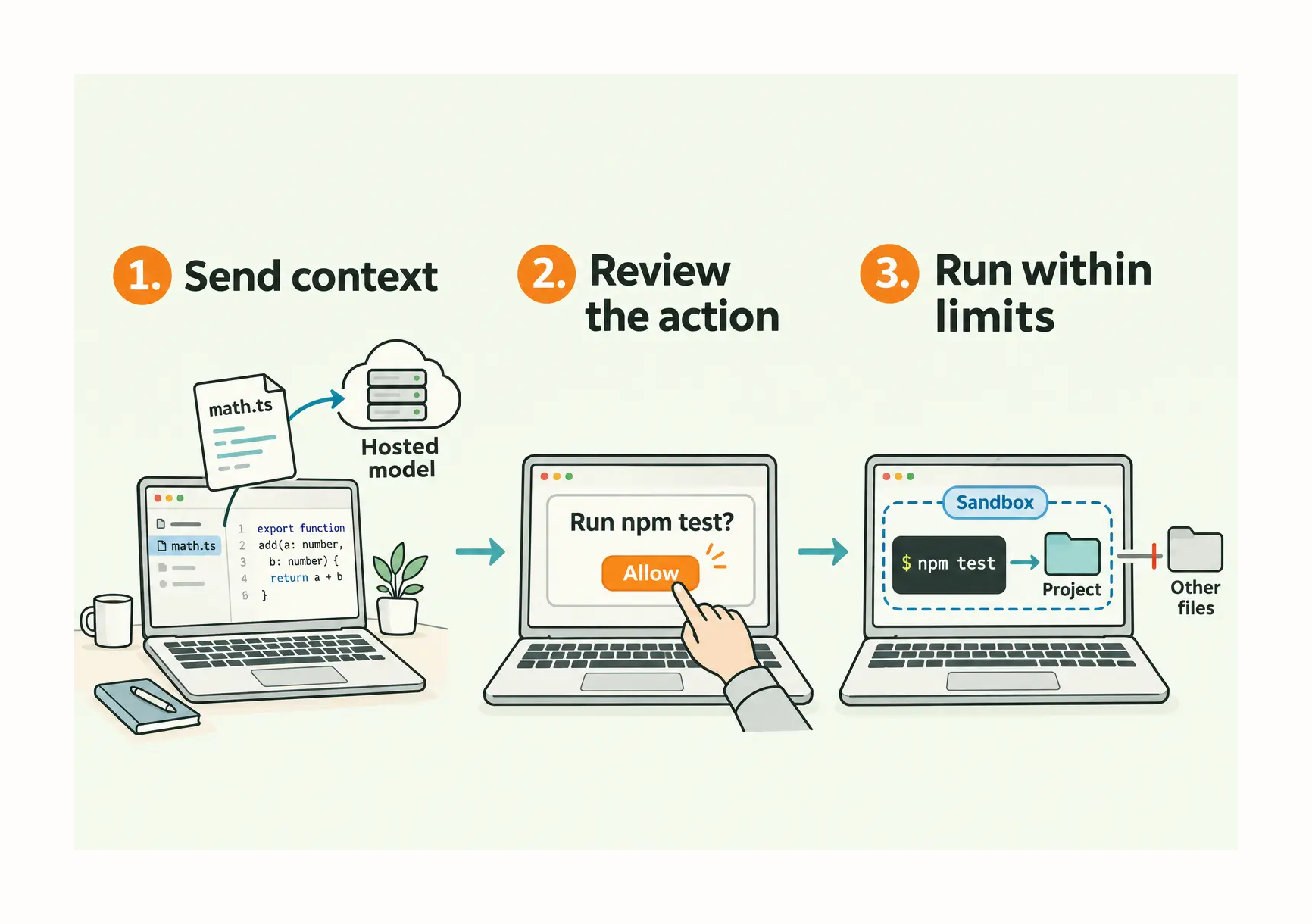
A person approves npm test, which runs inside a configured command sandbox. Cloud tasks run remotely.
A failed test command may need a missing dependency or network access rather than a code change. Read that error before granting broader permissions. Running commands on your computer also does not keep the model local: these apps can send code context to a hosted model.
Compare Claude Code and Codex on the Same Coding Task
A small validation fix tells us more about working with an agent than a request to build a whole application. You can see whether the behavior changed, and the patch is small enough to discuss. The tool you already have is enough to start.
Take a contact form that accepts a name made entirely of spaces. The fix should reject that input while still accepting a valid name. If your project has no form, keeping completed to-do items out of the active list gives you another visible change to check.
We want to know which edits came from the agent. Before it starts, check git status and git diff, then commit your own intended changes. Leave other people's unfinished files out of that commit. Otherwise, a correction you made earlier can look like part of the agent's solution.
For the form, a request can be this small:
Find the name validation for this form. Reject names that contain only spaces, keep valid names working, and add or update the relevant test. Use the project's existing tools. Explain the files you expect to change before editing. Show the diff and the test command and result when finished. Do not commit or publish.
The useful part starts when the agent returns the patch. Does its validation reject spaces, or does it also reject something the form should accept? Asking it to explain that condition gives you a specific point to discuss. If you would rather make the edit yourself, you can ask for a proposed change and explanation first.
A green test is reassuring only if it checks the behavior you wanted. We would ask for the test before the fix so its results can show the original failure and the corrected behavior. Then try the form on the page: submit a spaces-only name, followed by a valid name. The page can reveal a result the automated test missed.
If you do not read code, you can still check those two submissions in the desktop workflow. For the to-do example, complete an item and see whether it disappears from the active list.
By then, you have something concrete to compare: how much explaining and correcting the patch required, how long each revision took, and how much allowance the task used. The final commit should contain only the intended files you have checked. A fast first answer loses some of its appeal if you spend the rest of the session getting a small requirement restored.
Optional: compare both tools. Separate clones or Git worktrees at the same starting commit let you give Claude Code and Codex the same request without their edits colliding. The same task makes the correction and waiting easier to compare. You do not need to buy both tools to try the exercise.
Claude Code vs Codex Performance: Scores, Speed, and Review Time
In the four configurations below, Artificial Analysis gives Claude Code with Opus 5.5 the highest task score; the two Codex configurations have shorter runtimes.
We care about the time from asking for a change to accepting it. For a string of small edits, we prefer a shorter wait between requests. A slower run can be worth waiting for when it leaves less work to correct.
Artificial Analysis: Opus, Fable, Astra, and Sol Compared
In Codex, you choose OpenAI models such as Astra and Sol; in Claude Code, you choose Anthropic models such as Opus and Fable. Open the model selector in your coding session, or type /model in either CLI. Models included in your plan use its allowance. On Claude Pro, Fable uses usage credits. On Max and Ultra, it draws from the plan's weekly allowance.
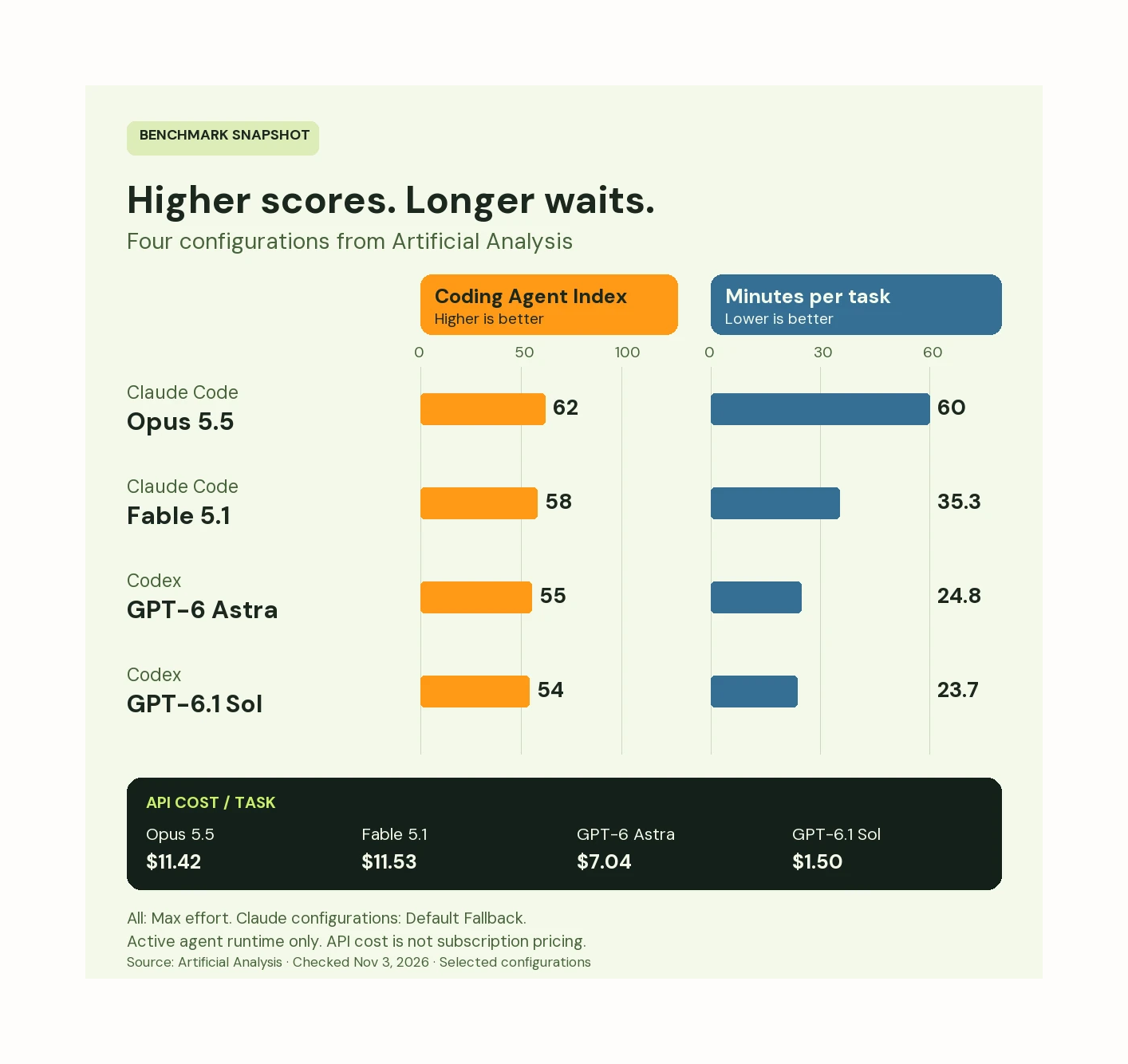
Artificial Analysis comparison, checked November 3, 2026. Max reasoning effort for all four configurations.
Within Claude Code, Fable's shorter runtime makes it the option we would try when waiting between small edits becomes frustrating. If we were paying through the API, Sol's lower cost per task would put it on our shortlist for repeated jobs. We would still want to see how much correction either leaves on our own task.
Missing Requirements Leave the Agent to Decide
In a published 48-run comparison, the book-site ticket asked for a year of caching without spelling out the exact response headers. Five of the six runs chose asset headers that did not match the researcher's expectations. That makes us look at what the request left out before blaming the agent.
For the seven clearer tickets, the researcher had a preparation agent work from changes he had already completed. It wrote requirements covering the behavior in his scoring tests. The implementing agents saw those requests, not the tests. On these tickets, all 42 runs passed, three per tool on each ticket.
We have also seen an automated reviewer catch an incorrect column heading in a patch whose checks had passed. The tests expected the same wrong wording. Comparing the result with the original request caught the mismatch the tests had missed.
Claude Code vs Codex Pricing and Usage Limits
Claude Code is included in paid Claude Pro, Max, and Ultra plans. Codex has a limited free desktop offer and broader access on paid ChatGPT plans. The individual web-subscription prices below were checked on November 9, 2026, in US dollars per month before tax.
The OpenAI pricing page limits Free and Go's offer to Luna on desktop. Sign in and check whether Luna is offered before planning around free access. Claude's pricing page includes Claude Code on Pro, Max, and Ultra. Claude chat and Claude Code draw from one allowance. Codex shares usage with ChatGPT Work, used for research and deliverables such as documents and spreadsheets.
What Happens When Claude Code or Codex Hits a Usage Limit?
When Claude Code or Codex stops for a usage limit, check the remaining allowance and reset time first. If the reset is close, we wait. If the work cannot wait, weigh the price of extra usage against switching tools. A switch needs a handoff note explaining the current files and what remains to do.
Pro Codex plans currently have no five-hour limit. Plus can encounter five-hour and weekly limits. Claude Pro and Max have both; verified Ultra accounts have no five-hour limit but still have a weekly allowance. On Max and Ultra, Fable counts toward the plan's weekly allowance and can use up to half of it.
For Codex, the usage dashboard shows remaining allowance and reset times. In the CLI, /status shows remaining limits alongside session information; /usage opens account token activity and a reset option if one is available. In Claude Code, /usage shows plan usage. Starting a new chat or switching models does not refill a shared allowance.
Should You Choose Claude Code, Codex, or Both?
If you have $20 a month, no existing subscription, and can review a small code change, our starting choice is ChatGPT Plus with Codex. We like the diff pane's line comments and Git controls for deciding which changes to keep. The wait between small edits remains a drawback for us.
An existing Claude Pro subscription is a reason to start with Claude Code instead. If you specifically want to approve file edits yourself, Claude's Manual mode gives you that control; Codex's Ask for approval mode lets it edit files inside the workspace without asking each time. If the free Codex desktop offer is available on your account, it is also a way to try a small task before spending $20.
Claude Code with Opus 5.5 is worth trying if you want the highest-scoring configuration in that four-configuration chart and can tolerate its longer runtime on your own task.
Paying for both makes sense to us when a second agent reviews the same patch independently, or when the other tool supports an integration our current one cannot use.
MCP, Hooks, and Skills: What Changes When You Switch?
MCP connects agents to external tools and data. Hooks run scripts at events such as a tool call, and skills provide reusable task instructions. You do not need to migrate all of them to try the small change above.
For an established project, test the connections you rely on before switching. In older releases, we saw Claude Code lose information from the middle of a long MCP error response and Codex miss a newly added server tool. Moving hooks and skills can also require changes and another round of testing.
AGENTS.md vs CLAUDE.md: Which Instructions Load?
For a project that already has agent instructions, Codex reads AGENTS.md project instructions; more specific files nearer the working directory override guidance from parent directories. Under Claude Code's default rules, a CLAUDE.md, .claude/CLAUDE.md, or CLAUDE.local.md in the working directory or above takes precedence over AGENTS.md. Without those project files, Claude can read AGENTS.md directly on v2.1.277 or later unless the bundled AGENTS.md reader has been disabled.
On a current Claude version, use /memory to check what loaded. To share AGENTS.md when a CLAUDE.md already takes precedence, import @AGENTS.md from a CLAUDE.md beside it, or change Project instructions to load both. Copying a file into the repository alone does not prove both agents received it.
Use Claude Code and Codex Together in Alook
In Alook, multi agent collaboration keeps the task, review findings, and human decision in one project channel. The setup tutorial connects your existing tools as bots from your computer. Give the reviewer the commit or patch under discussion; joining the channel does not synchronize its working files or instruction files. Our guide to using Claude Code and Codex together covers the handoff in more detail.
We recently updated the checklist our bots use when handing an article over for review. A second bot found two conflicting instructions: one required the output of failed tests in the handoff; an older rule said to leave it out. It also found an outdated instruction about recording when an article was updated. We corrected both and checked the list again.
That is the review job we want a second bot to do on code, too: question the result and name a problem we can check.
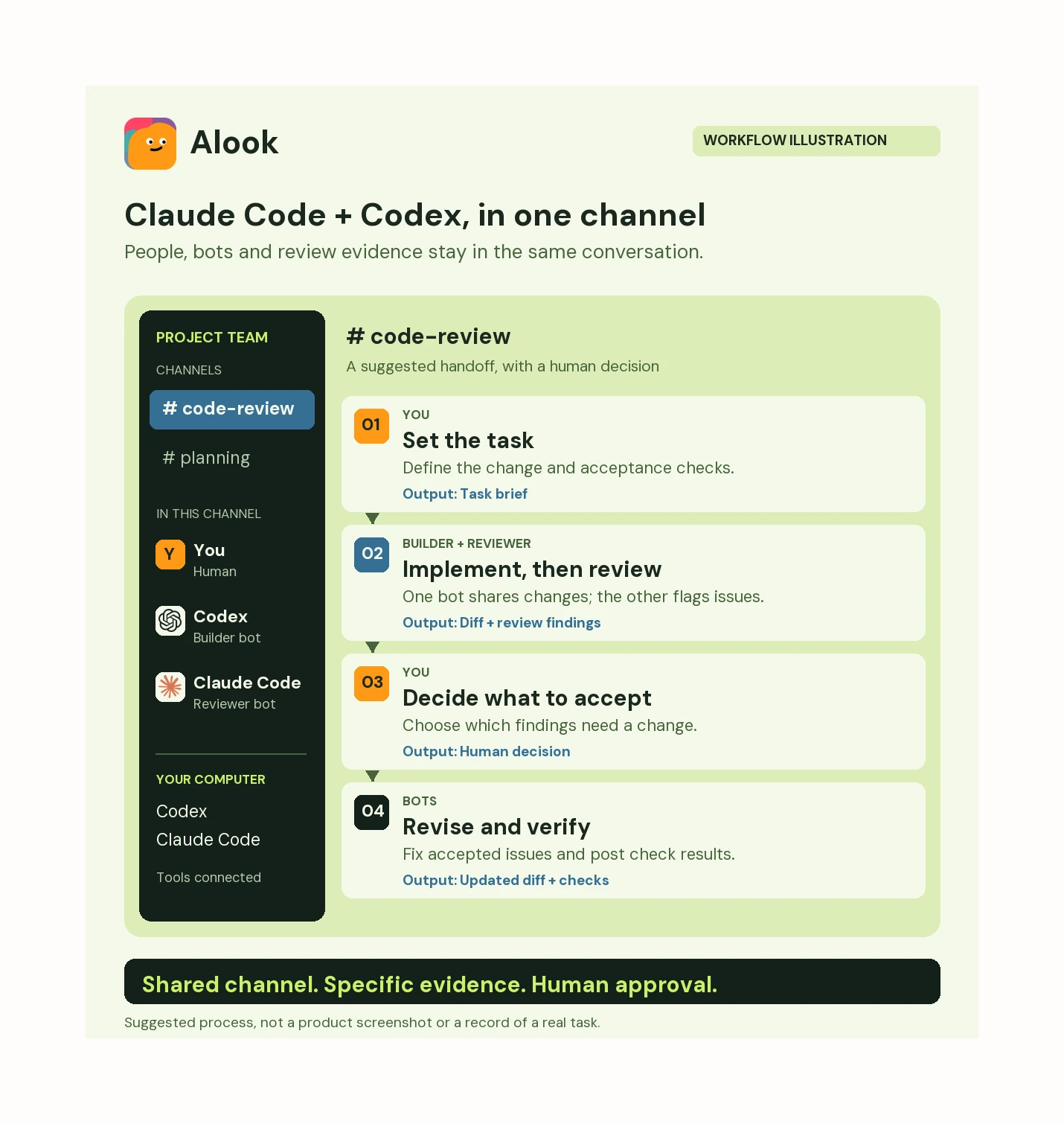
A suggested workflow. Codex implements and Claude Code reviews here; the roles can be reversed.
Claude Code and Codex FAQ
Do Claude Code and Codex Require an API Key?
Claude Code and Codex can both be used without an API key: Codex supports ChatGPT sign-in, and Claude Code supports Claude account sign-in with an eligible plan. API-key access is an alternative with separate API billing and limits.
Do Separate Git Worktrees Share Uncommitted Changes?
Separate Git worktrees do not share uncommitted files automatically. We give the reviewer a commit to check out or a patch to apply so both bots can inspect the same version.