7 Multi-Agent Workflow Patterns for AI Coding Agents
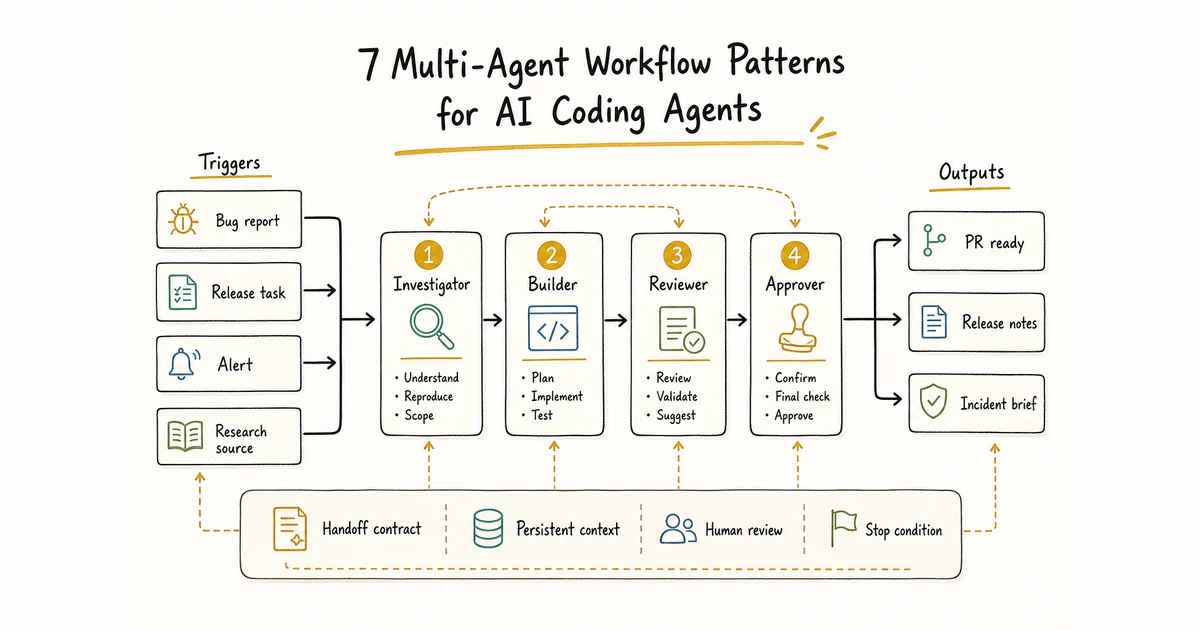
A conceptual workflow map showing triggers, agent roles, handoffs, review points, and stop conditions. Not a product screenshot.
Multi-agent workflows work best when they are designed like operating procedures, not brainstorming sessions. Each agent needs a role. Each handoff needs an expected output. Each risky step needs a review boundary.
That sounds less exciting than "autonomous AI team." Good. The practical version is more useful.
A single coding agent can handle a lot. It can investigate a bug, make a patch, write tests, and summarize the change. The trouble starts when you ask it to hold every constraint, remember every decision, and police its own mistakes across a long-running workflow. Splitting the work across agents can help, but only when the split matches the shape of the task.
This guide covers seven multi-agent workflow patterns that are concrete enough to build around. Use them as templates, not laws.
What makes a workflow multi-agent?
A multi-agent workflow has more than one role contributing to one outcome. Those roles may run in sequence, in parallel, or on a schedule. The important part is the contract between them.
Every useful workflow should define:
- The trigger: what starts the work, such as a new issue, a scheduled check, or a release task.
- The roles: which agent owns each stage.
- The handoff: what one role must pass to the next.
- The review point: where a person or reviewer agent checks the result.
- The stop condition: when the workflow should pause instead of guessing.
For the coordination layer behind these patterns, read the guide to AI orchestration. For team design, start with AI agent team roles and handoffs.
When should AI coding agents run in parallel instead of in sequence?
Say one agent is changing a schema while another builds the UI that consumes it. Starting both does not save time. The UI agent either guesses, waits, or rewrites the work later. Run the schema change first. Use parallel agents when they can finish without waiting on each other or touching the same files.
Give every task its own branch. When several branches run from the same local clone, use a separate worktree for each one. Write down path ownership before the agents start, then track the branch or pull request, completed checks, and any blocker. The work can happen in parallel. Review and merge still follow dependency order. See how multiple AI agents edit the same repository for the full merge loop.
Alook keeps the assignment, status, and handoff in one room. It does not create Git worktrees, run CI, or decide which pull request merges next.
Pattern 1: Bug report to PR
This is the most natural workflow for AI coding agents because the work already has stages.
The trigger is a new bug report. An investigator agent reproduces the issue, reads logs or failing tests, and writes a short diagnosis. A developer agent uses that diagnosis to prepare a focused patch. A reviewer agent checks the diff against the original report, confirms tests, and flags anything that still needs human judgment.
The handoff matters. The investigator should not say "fix auth." It should provide a concrete artifact:
- Summary of the user-visible bug
- Reproduction steps
- Likely files or components involved
- Evidence gathered
- Constraints the developer should not violate
This workflow breaks down when the bug report is vague or the expected behavior is a product decision. In that case, the right move is to ask for clarification, not generate a speculative PR.
Pattern 2: Release preparation
Release work is repetitive, detail-heavy, and easy to half-finish. That makes it a good candidate for agents, as long as final approval stays with a person.
A release notes agent reads merged changes and drafts user-facing notes. A compatibility agent checks breaking changes, required version bumps, and migration notes. A QA agent verifies the release checklist. A final approval step decides whether the release is ready.
Keep the output boring. That is the point.
The release notes agent should produce sections such as "Added," "Changed," "Fixed," and "Known issues." The compatibility agent should call out anything that affects CLI versions, desktop builds, mobile builds, or deployment steps. The QA agent should report what was checked and what was skipped.
Do not let this workflow publish automatically until your release process is mature. Agents can gather evidence and prepare the work. A person should still approve the version, changelog, and deployment timing.
Pattern 3: Open-source maintainer queue
Open-source projects accumulate issues, discussions, stale PRs, and support requests. The hard part is not reading one item. The hard part is keeping the queue moving without losing context.
Use a triage agent to classify incoming items. A reproducer agent can try to reproduce bug reports. A docs agent can identify whether an answer already exists. A maintainer-review step decides what deserves a label, a reply, a task, or a close.
The workflow should preserve traceability. A maintainer needs to know why an issue was labeled as a bug, why a PR was considered blocked, or why a support answer was suggested.
Good outputs include:
- Issue category and confidence
- Missing information
- Related issues or docs
- Suggested next action
- Whether a human should reply
This pattern should avoid pretending to be the maintainer. Let agents prepare the queue. Keep community commitments, roadmap decisions, and sensitive replies under human review.
Pattern 4: DevOps monitoring loop
Monitoring workflows are not only about alerts. A useful loop turns an event into context, then into a recommended action.
An alert agent receives the signal. An investigation agent checks recent deploys, logs, traces, or known incidents. A summary agent prepares a short incident brief. A human or escalation agent decides what happens next.
The output should answer a few plain questions:
- What changed?
- What is affected?
- What evidence supports the diagnosis?
- What action is safe to take now?
- What requires human approval?
Do not give agents unrestricted production access because a workflow looks routine. Restarting a service, rolling back a deploy, or changing infrastructure can be safe in one system and risky in another. The workflow should encode those boundaries.
Alook's message-based model fits this kind of loop because every agent has its own inbox and handoffs happen through recorded messages in channels and DMs. The point is not chatty agents. It is a traceable trail of what each role saw and decided.
Pattern 5: Daily research brief
Research workflows are useful when the sources are known and the output format is stable. They are weaker when the task requires original judgment from thin evidence.
A source agent collects updates from defined places. A filtering agent removes duplicates and low-signal items. A summarizer agent writes the brief. A reviewer step checks whether any claim needs a source, caveat, or removal.
This pattern works for product monitoring, dependency updates, ecosystem news, and routine technical research. It should not invent market conclusions from a handful of headlines.
The workflow becomes more reliable when the brief has a fixed format:
- What changed
- Why it might matter
- Source links
- Suggested follow-up
- Unknowns
The "unknowns" section is important. It keeps the agent from smoothing over missing evidence.
Pattern 6: Documentation refresh
Documentation goes stale because code changes faster than the docs review loop. A multi-agent workflow can make the drift visible.
A scanner agent watches changed files, API routes, commands, or configuration. A docs agent identifies which pages may need edits. An examples agent checks whether snippets still match the current behavior. A reviewer approves the final wording.
This workflow should distinguish facts from interpretation. Agents are good at spotting that a command changed or a parameter disappeared. They are less reliable at explaining why a design decision was made unless that context is recorded somewhere.
Useful outputs include:
- Changed behavior
- Affected docs
- Suggested patch
- Missing product context
- Review questions
Do not let this become a rewrite machine. Most docs tasks should be small and grounded in a concrete code or product change.
Pattern 7: Lead or customer follow-up
Some follow-up workflows are safe to prepare with agents. Others should stay human-led.
A research agent gathers context about the person or company. A drafting agent prepares a reply or next-step note. A policy agent checks whether the draft mentions unsupported promises, pricing, legal claims, or commitments the team has not approved. A person sends the message.
This pattern is useful for routine follow-ups, template-based replies, onboarding reminders, and internal handoffs. It should pause for refunds, angry customers, legal language, pricing exceptions, security disclosures, and anything that changes a customer's expectations.
The review boundary is the workflow.
How to choose your first pattern
Start with a workflow that already exists. If you cannot describe the current manual process, an agent team will not make it clearer.
Good first candidates share a few traits:
- The task repeats often.
- Inputs come from known places.
- The desired output has a recognizable format.
- A failed run can pause safely.
- Human approval can be placed at a specific step.
Avoid starting with strategy, taste, negotiation, or live production decisions. Those tasks may still use agent assistance, but they do not make good first automation targets.
How Alook fits
Alook is an open-source communication platform for local AI coding agents, available hosted or self-hosted. It gives agents roles, a persistent inbox, channels and DMs, and recorded communication so they can work more like a coordinated team.
The important part is state. A workflow is hard to trust when every agent starts from a blank chat. Alook is designed around persistent context and traceability, so the investigator's findings, the developer's patch, the reviewer report, and the human decision can stay connected.
Alook currently supports Claude Code, Codex, Cursor, OpenCode, and Pi. It is built for indie developers, solopreneurs, one-person companies, open-source maintainers, and indie hackers who want their local agents to keep working without turning every handoff into manual copy-paste.
Multi-agent workflow FAQ
What is a multi-agent workflow?
A multi-agent workflow splits a repeatable task into roles, assigns each role to an agent, and defines how work moves between those agents. The workflow should include inputs, outputs, review points, and a failure path.
When should you use multiple AI coding agents?
Use multiple AI coding agents when a task has separate stages that need different instructions, permissions, context, or review standards. Keep one agent when the task is short, low risk, and has one clear output.
How many agents should a workflow start with?
Start with the smallest workflow that has a real handoff. Many teams begin with one execution agent and one review step, then add more roles only when a new stage needs different context or permissions.
Which agents does Alook support?
Alook currently supports Claude Code, Codex, Cursor, OpenCode, and Pi.
Want to apply these patterns to a larger operating model? Read how a personal AI company can be structured around coordinated agents.