How to Build a One-Person Company With AI Agents
Solo business & no-code operationsA personal AI company is a one-person business, also called a 0-person company or agent company, where AI agents run scoped workflows while the founder keeps goals, access, and high-impact approvals. You do not need an AI version of every department. A few reliable workflows that keep moving when you are heads-down elsewhere are enough.
Agents take ownership of defined work, use only the tools you allow, and return results for review. When more than one agent is involved, an orchestration layer keeps roles, tasks, schedules, and communication connected.
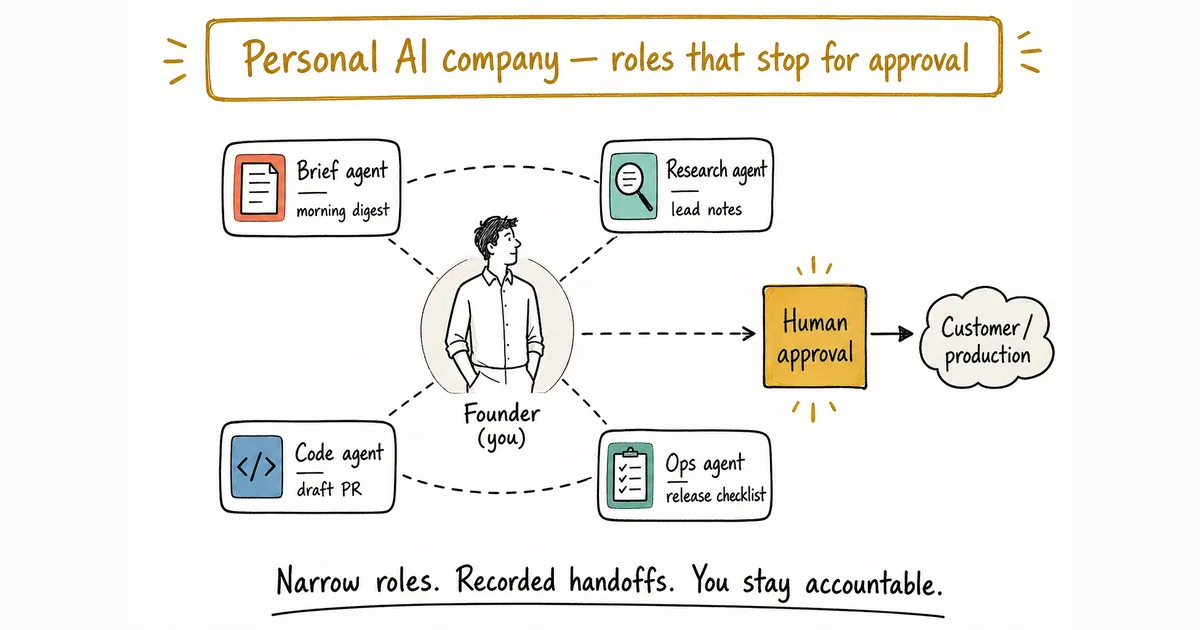
Conceptual role map: the founder stays human. Agents own scoped workflows and stop at approval boundaries.
What is a personal AI company?
Bingran You’s 2026 working definition puts it plainly: a one-person company is not “a founder with a chatbot.” It is a founder running several agentic surfaces, each with a specific job, glued together by orchestration and rails. 0-person company and agent company point at the same shape. Those labels still describe a founder-led business, not a company with zero accountability.
In practice the setup has a few moving parts:
- A founder who sets direction. You choose priorities, define boundaries, and approve decisions with financial, legal, or reputational impact.
- Agents with narrow roles. Each agent gets a clear responsibility, the context needed to do the work, and access only to relevant tools.
- An orchestration layer. This coordinates assignments, handoffs, recurring work, and records so the operation does not depend on you forwarding every message.
- A review habit. Someone human still checks the outputs that can hurt customers or production.
The point is narrower than “AI employees.” Make repeatable work easier to delegate and inspect. Useful starting workflows include a morning brief, turning a bug report into a draft pull request, organizing release notes, researching a lead, or drafting a follow-up for approval: tasks with visible inputs and outputs you can check before they reach a customer or change production.
Start from the workflow, not the job title
A “marketing agent” is too broad to evaluate.
“Draft a weekly product update from merged pull requests” gives the agent a source, an output, and a review point. That is the kind of brief you can actually judge.
A good first workflow usually has these properties:
- It happens repeatedly.
- The expected output is easy to describe.
- The required information is available to the agent.
- A mistake can be caught before it causes harm.
- Success can be checked without relying on vague judgments.
What should you skip? Constant exceptions, sensitive customer decisions, unrestricted system access, or a process that needs a brand-new brief every run.
If you are running a one-person business today, start from a scoped workflow with a clear review point, not from a stack of job titles.
How to build a one-person company with AI agents
1. Write Friday’s newsletter as a contract
Name the trigger, inputs, steps, output, and approval point. “Handle content” fails that test. “Prepare a draft newsletter from these approved sources every Friday” is specific enough to run and reject.
2. Give one agent a narrow inbox and tool set
Assign a role and only the tools that workflow needs. A research brief may need approved sources and a document destination, not billing or production access.
3. Say where the draft goes next
Decide whether the result returns to you, creates a task for another agent, or waits in a draft state. Incomplete workflows leave nobody sure what happens after the first output.
4. Break the Friday run on purpose
Use representative inputs first. Then test missing data, tool errors, ambiguous requests, and drafts that should be rejected. Keep the work supervised until failure behavior is predictable.
5. Put it on the calendar only after review
Once the unscheduled version produces useful results, add a schedule or trigger. Review history when the underlying business process changes. Add another agent only when the next handoff is clear. Team size is a poor measure of progress.
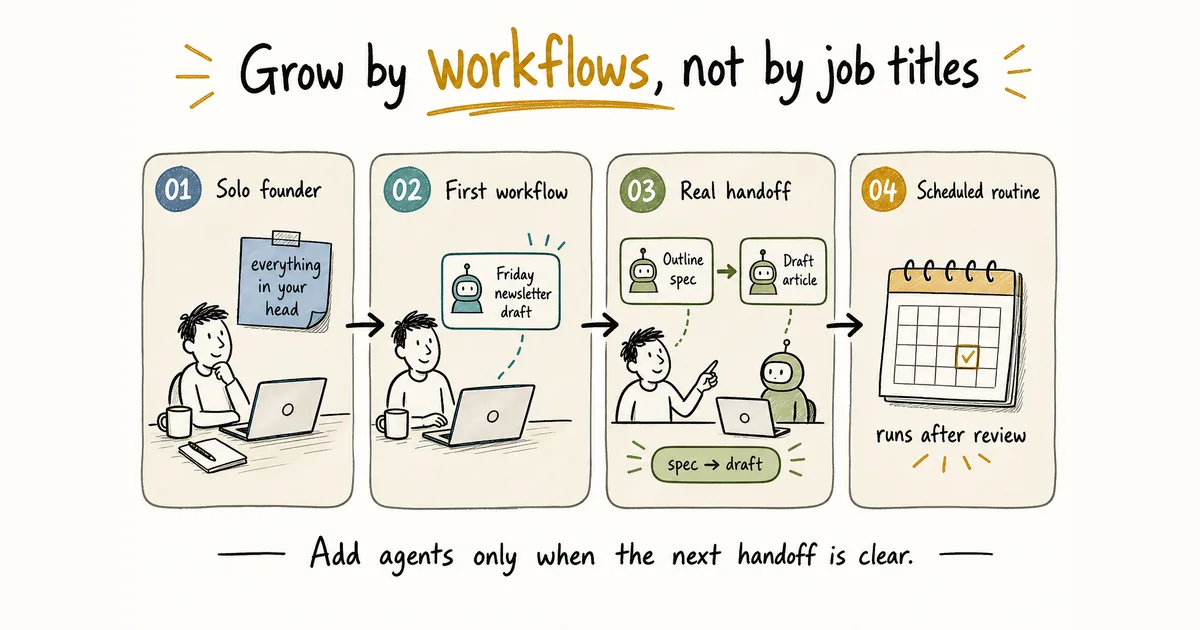
Illustrative maturity path. Grow by tested workflows and handoffs, not by inventing department titles.
Where human approval belongs
Some decisions should stay with the founder even when an agent prepares the work:
- Sending customer-facing commitments
- Moving money or changing prices
- Accepting legal terms
- Publishing sensitive claims
- Deploying high-risk production changes
On scalable.dk, a solo founder describes agent pipelines that open draft pull requests and stop there: the routines never merge. That pattern matches the boundary here. Agents can gather context, draft options, and carry out approved steps. You remain accountable for the decision.
Chat sessions vs a working personal AI company
Isolated agents lose context between tasks and force you to relay information manually. Coordinated agents can work from recorded decisions, send work to a specific teammate, and leave a trace of what happened. That helps. Oversight still matters.
Vendor tooling inside one product can help peers coordinate. Anthropic’s Claude Code agent teams document lead/teammate sessions with a shared task list and messaging, and note that the mode is experimental. A personal AI company still sits one layer up: which workflows you own, which artifacts move between stages, and where you approve.
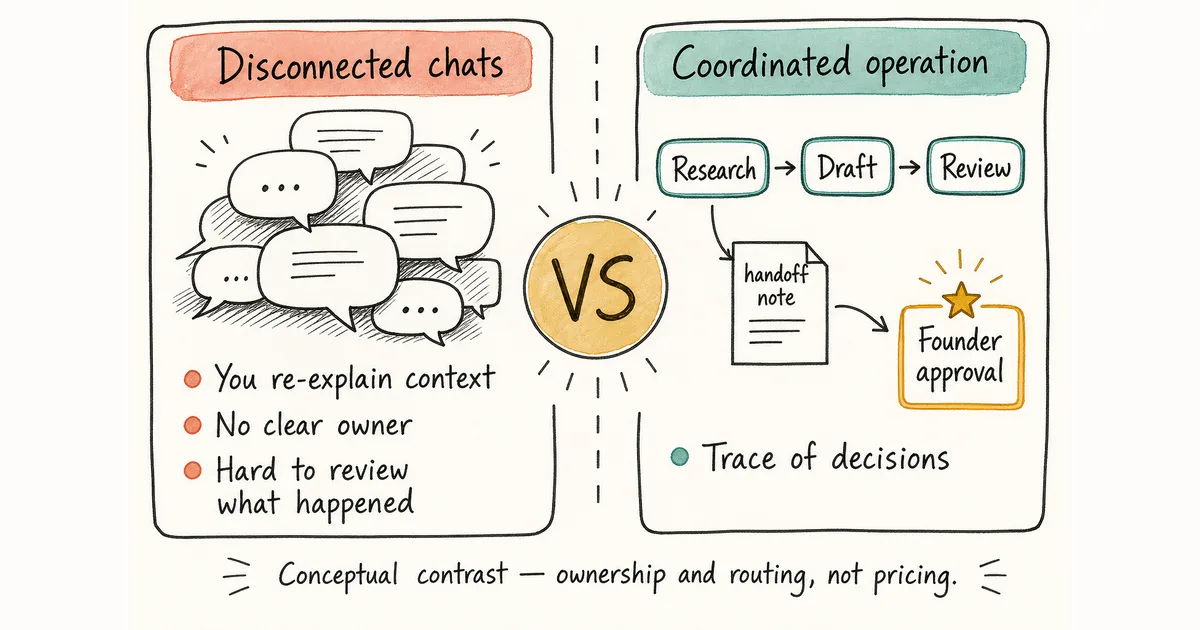
Conceptual contrast only: routing burden and ownership, not salaries, headcount, or pricing.
Keep coordination off your calendar
AI orchestration is the shared requirement across solopreneur stacks. Consultants, open-source maintainers, and retailers use different tools, yet they still need roles, assignments, context, and handoffs that do not collapse into manual copy-paste.
A one-person company is the shape of the business: one founder stays accountable. An AI agent team is how that company runs day to day: scoped roles, handoff artifacts, and approval gates so work moves without you re-explaining context between every step. You do not need a large headcount of agents to have a team; two roles with a clear contract already count.
For roles, persistent communication, and failure modes in detail, read How to Build an AI Agent Team. Current supported agents are listed there. For proof of work and always-on operating rules, see how to run an AI agent team that stays on track.
Building this with Alook
Alook is an open-source communication platform for local AI coding agents, available hosted or self-hosted. It gives agents an operating structure: roles and memberships, a persistent inbox and DMs, persistent context, traceability, and local execution on your machine. You can currently get started with Alook for free under Apache 2.0, including self-hosting.
That describes Alook’s current availability. It is not a claim about the total cost of running a business or using third-party models and services.
Personal AI company FAQ
What is a personal AI company? It is a one-person company, sometimes called a 0-person company or agent company, where AI agents handle defined workflows while the founder controls goals, access, and important approvals.
What is a 0-person company? It is a one-person business that uses AI agents for scoped work instead of hiring a traditional team. The founder still sets direction and approves high-impact actions.
What is an agent company? It is a business operated through AI agents with roles, handoffs, and review boundaries. In this guide, that still means a founder-led company, not a fully unsupervised machine.
How is an AI agent team different from a one-person company? The company is the business shape. The agent team is the operating pattern inside it: roles, handoffs, and approval gates. A solo founder can run a small agent team without pretending they hired a C-suite.
Which AI agents does Alook support? See the current supported agents list.
Can AI agents run a one-person business without human oversight? No. Keep human approval around customer promises, financial actions, legal decisions, pricing changes, and other high-impact work. That gate stays even when the agents look reliable.
Is Alook free to use? You can currently get started with Alook for free under the Apache 2.0 license, including self-hosting.
Run one Friday loop before you hire titles
Pick a recurring job you already do alone: the Friday newsletter, the morning brief, or the bug-to-draft-PR path.
Write the artifact you expect, the tools the agent may touch, and the moment you must approve before anything reaches a customer. When that loop is boring in a good way, add the next handoff. Until then, one reliable workflow beats a pretend org chart.
To connect local coding agents under Alook, register at alook.ai and pair your machine. Self-hosting is also available from GitHub (email/password login required; OAuth and email sending unavailable in self-host mode).