No-Code Automation With AI Agents: Beyond Trigger-and-Action Workflows
Solo business & no-code operations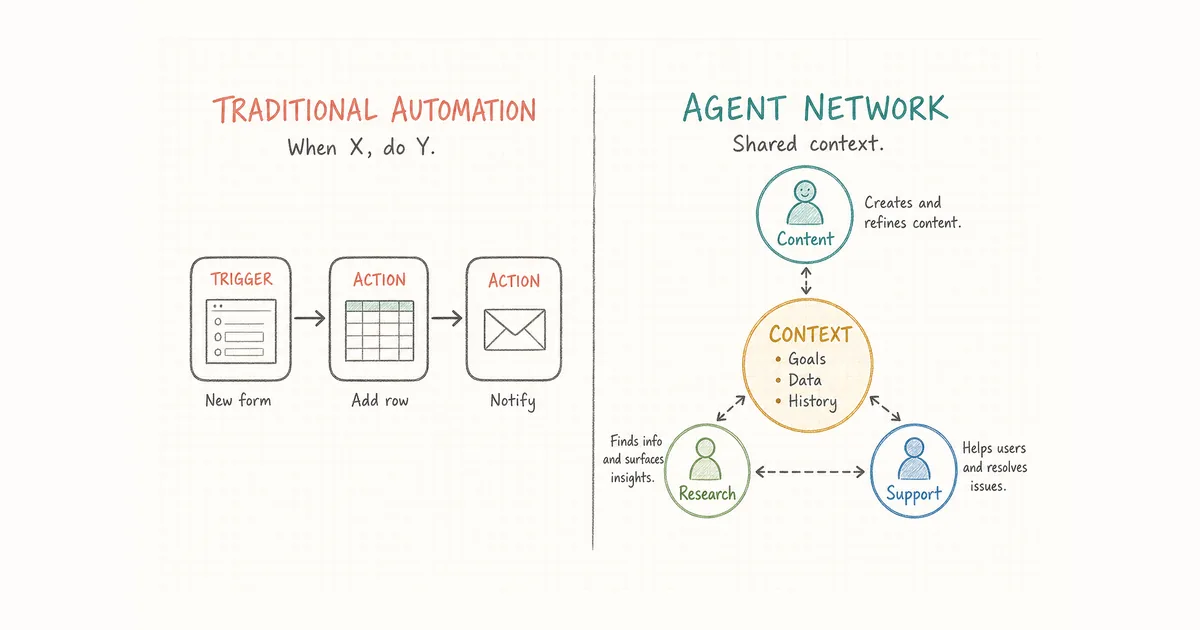
Most people who search for no code automation want the same thing: stop doing the boring, repeatable steps by hand. A new form reply should land in a spreadsheet. A closed deal should post to Slack. A follow-up email should go out without opening the CRM every time.
That is what trigger-and-action tools are for. You name an event that starts the run, then name what happens next. Zapier calls each of those workflows a Zap: a trigger plus one or more actions. Make and n8n use the same idea with different builders. For a longer overview of the category, Zapier's own guide to no-code automation is a clear starting point.
Then the work gets less tidy. A step needs a judgment call. Several drafts have to stay consistent with each other. You end up copying results from one place into the next. Fixed "when X, do Y" rules still help, but they are no longer enough on their own. That is where AI agents start to matter.
What no-code automation actually covers
No-code automation means building a process without writing code. You pick a trigger, pick an action, and the platform runs it for you. New spreadsheet row → send email. New signup → add to a list. New support ticket → tag and route it.
It shines on work that is repetitive and rule-based:
- Move data between apps that do not talk to each other on their own
- Notify a channel when something changes
- Log form responses, tag them, file them
- Kick off a fixed sequence on a schedule
If your task is "when X happens, do Y," this is the right tool. You can automate repetitive tasks without coding and leave it alone. No agents required.
Where "when X happens, do Y" stops helping
The trouble starts when a task stops being a straight line.
A trigger-and-action run does exactly what you configured, in the order you set. It does not weigh options, rewrite a messy note, or decide what the next sensible step should be. The moment that kind of judgment shows up, the run waits on you.
Parallel work makes this louder. Say you are shipping a product update. Marketing copy, a docs change, a support reply template, and a customer email all need to agree. Separate automations for each step do not share a single record of what shipped. The support template can mention a feature the docs have not described yet. You become the person who keeps everything aligned, only with more browser tabs open.
Rule-based automation scales with the number of rules. It does not scale with the number of decisions.
Automate repetitive tasks without coding, without one overloaded chatbot
The next instinct is to hand everything to a single AI chat assistant. That is smarter than a fixed rule: it can read, draft, and reason. But one assistant still tends to work one task at a time. While it drafts your newsletter, support replies wait. While it researches a competitor, release notes sit untouched.
You traded a rigid workflow for a smarter queue. The bottleneck just changed seats.
Several narrow agents behave differently. Each owns a piece of work and can run at the same time. A content agent drafts while a research agent digs while an ops agent stages the customer note. Progress does not wait for one shared chat thread to free up.
No-code automation with AI agents: roles, handoffs, shared context
Multiple agents only feel like a team when a few things are explicit. You do not have to script them in code. You describe them.
- Roles. Each agent owns a domain and gets only the access that role needs. A research agent reads approved sources and writes to a document. It has no reason to touch billing.
- Handoffs. When one agent finishes, its output goes somewhere specific: to another agent, to a draft queue, or back to you for approval.
- Shared context. Agents work from the same record of decisions. When a product change ships, the support-oriented agent can see it. You are not manually syncing what each session believes is true.
- Approval points. You stay accountable for customer promises, money, pricing, and anything risky. Agents prepare the work; you sign off.
This is still "no code" in a practical sense: you set up the team in plain language instead of maintaining custom integration scripts. The coordination layer is the product. For how that layer runs across agents, see AI agent orchestration.
AI automation without code: pick the tool that matches the job
You do not need one approach for everything. Match the tool to the shape of the work.
Use trigger-and-action tools (Zapier, Make, n8n, and similar) when:
- The step is a clear rule with a known trigger and action
- No judgment is involved
- One app just needs to tell another that something happened
Use an AI agent team when:
- Work spans several roles that must stay consistent
- Steps need reading, drafting, or deciding, beyond moving data between apps
- You would otherwise copy results between separate AI sessions
Most solo founders and small teams end up running both. A few trigger-and-action workflows handle the plumbing. An orchestration layer handles the thinking work that used to land on you. If you are mapping who owns what, the guide to building an AI agent team walks through roles and handoffs, and building a one-person business with AI agents covers where human approval belongs.
Where Alook fits
Alook is an open-source communication platform that gives local AI coding agents a shared coordination surface. You describe roles and relationships; agents communicate through persistent rooms and DMs rather than requiring you to write orchestration code. It currently supports Claude Code, Codex, Cursor, OpenCode, and Pi. The project lives on GitHub.
Alook gives those agents an operating structure:
- Roles and memberships that define who owns each kind of work
- A persistent inbox so people and agents exchange instructions and replies
- Persistent context and a trace of instructions, decisions, and responses
- Local execution, so agents and their tool access stay on your machine while you reach them from anywhere
You can start for free: register at alook.ai, then connect your local runtime. The project is Apache 2.0 licensed and can be self-hosted.
No-code automation FAQ
What is no-code automation?
It lets you build automated processes without writing code. You connect apps by choosing a trigger and an action. A form submission can create a row; a new row can send a notification. It fits repetitive, rule-based work across tools.
Is no-code automation the same as AI agent automation?
No. Trigger-and-action automation moves data on fixed rules. AI agent automation adds judgment and multi-step work, with agents drafting, researching, and deciding within a role before handing off.
Can you automate repetitive tasks without coding and still use multiple AI agents?
Yes. You describe each agent's role and the handoffs in plain language instead of building workflow graphs. Coordination happens through persistent rooms and operating rules you define for each agent.
When should you use trigger-and-action tools vs an AI agent team?
Use trigger-and-action tools for clear, rule-based steps between apps. Use an AI agent team when work spans several roles, needs shared context, and would otherwise leave you routing messages between sessions.
Start with one workflow
Pick the process that eats the most of your attention right now. If it is a straight "when X, do Y," a trigger-and-action tool solves it today. If it needs judgment across a few roles, that is where agents with shared context earn their place. Try Alook at alook.ai, or self-host from GitHub.