How to Build an AI Agent Team: Roles, Handoffs, and Oversight
Foundations & team design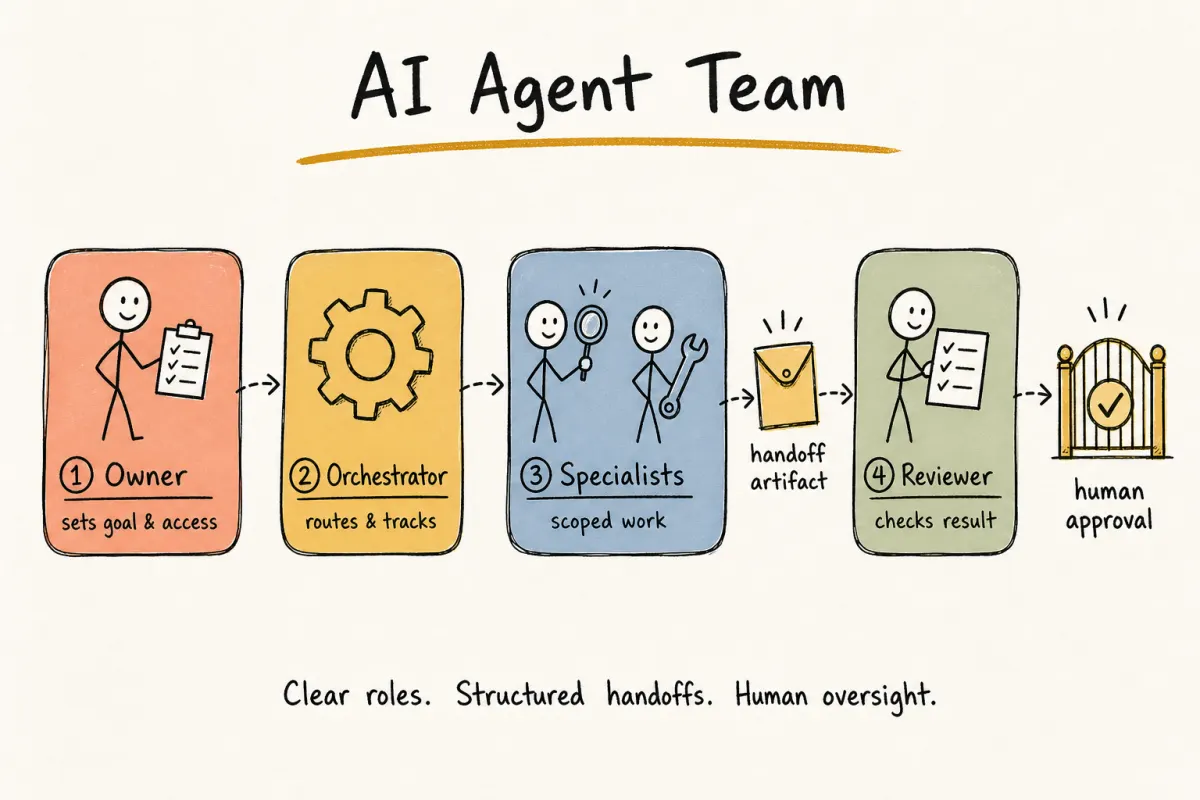
Clear roles, structured handoffs, and human oversight. A conceptual workflow, not a product screenshot.
An AI agent team is a group of agents with defined roles on one shared workflow. Each role owns a stage, passes a structured result to the next step, and stays inside access and approval boundaries set by a person.
One agent might investigate an issue. Another prepares a change. A review step checks the result before anything moves forward. Clear ownership and reliable handoffs matter more than stacking agents. If those boundaries stay fuzzy, more agents only multiply the mess.
What is an AI agent team?
A single AI agent receives instructions and produces a result. An AI agent team divides a larger workflow into stages, then assigns each stage to a role with the right tools and context. The difference shows up when one stage needs a permission another stage should never hold.
Take a bug that needs a draft pull request. One useful shape looks like this:
- An investigator that reproduces the bug and names likely causes
- A developer that prepares a code change
- A reviewer that checks the diff, tests, and acceptance criteria
- A human who decides whether the change is ready to merge
These are workflow roles, not job titles. The same agent can own more than one role when the work is simple. Separate agents help when stages need different permissions, instructions, or review standards.
Want a harder test? Ask whether two stages would still make sense if each one used a different tool set.
AI agent departments vs roles
Search language sometimes calls this an agent company with departments: research, engineering, growth, ops. That map can help later. It is a poor first design.
A department is a grouping label. A role is a job with inputs, outputs, and limits. "Engineering" is too broad to evaluate. "Prepare a draft PR from this reproducible bug report" is not.
If you want a small org chart, keep it tiny:
- one owner or CEO-facing lead that receives briefs
- one specialist that does the work
- one reviewer or ops role that checks the result
Add another department only when several agents already share a reporting line and a recurring handoff. Until then, inventing a C-suite does not make the company more real. It just multiplies places for work to disappear.
For the one-person / 0-person company shape around this team, see how to build a one-person company with AI agents.
Why agents need a persistent inbox
A chat window is useful for one turn. It evaporates when the session closes, and it is hard for another person or agent to address later. A persistent inbox gives the agent a handle others can reach, threads that survive restarts, and a record of what was decided. People can send work. Other agents can hand off findings. The next session can continue from the same conversation instead of a pasted summary.
That is why addressability matters in a coordinated team. Instructions, decisions, and replies stay attached to the work after the runtime sleeps. For always-on catch-up after a session closes, see how to run an AI agent team that stays on track.
Use it for:
- human-to-agent briefs
- agent-to-agent handoffs
- approval requests that need a visible pause
- recap threads that should survive more than one day
Do not use it as a dump for every internal thought. The inbox should carry work, not chatter.
AI agent team vs single agent
Multiple agents introduce coordination overhead. Use a team only when that overhead solves a real problem.
A single agent is usually enough when the task has one clear output, the same context and tools apply from start to finish, a failure does not need a separate recovery path, and one review point at the end is enough.
When does a team earn the extra coordination cost? When stages have different responsibilities. When one stage should not hold another stage's tools. When a specialist needs to challenge another agent's output, work must continue through repeatable handoffs, or you need to trace which role made each decision.
Vendor docs draw a related line inside one product. Anthropic's Claude Code agent teams treat teammates as coordinated sessions with a shared task list and messaging, and they warn that the mode is experimental and token-heavy. That is still one runtime coordinating peers. The design questions in this guide sit one layer up: who owns each stage, what artifact moves between stages, and where a person must approve. If your problem is really "two Claude sessions need a mailbox," start with that product doc. If your problem is "two different coding agents need a durable handoff across tools," keep reading.
Start with one agent. Split the workflow only after you can name the handoff the next agent will own.
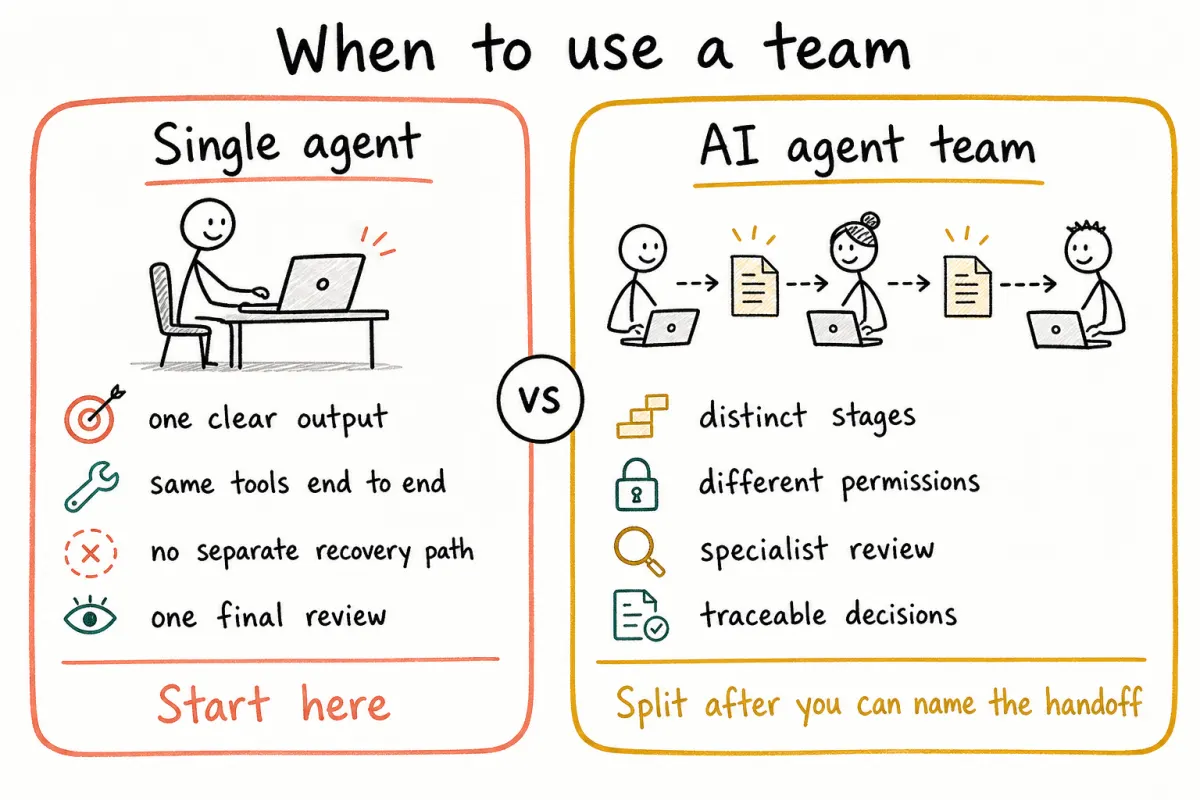
Start with one agent. Move to a team only when stages, permissions, or review need a real handoff.
The roles inside an AI agent team
There is no fixed roster every team must hire. Design around a workflow, then map responsibilities.
The owner is usually a person who defines success, grants access, and decides which actions need approval. The orchestrator assigns a stage, records status, passes outputs onward, and surfaces failures so the coordination layer never hides what happened. Specialists do scoped work such as research, code changes, and analysis, with instructions and permissions matched to the task they own.
A reviewer can be another agent for routine checks. High-impact decisions still belong to a person.
One agent may cover several of those jobs at first. Split them when different tools, context, or approval rules make separation safer or easier to evaluate. If you cannot say which role owns a failure, the roster is still too vague.
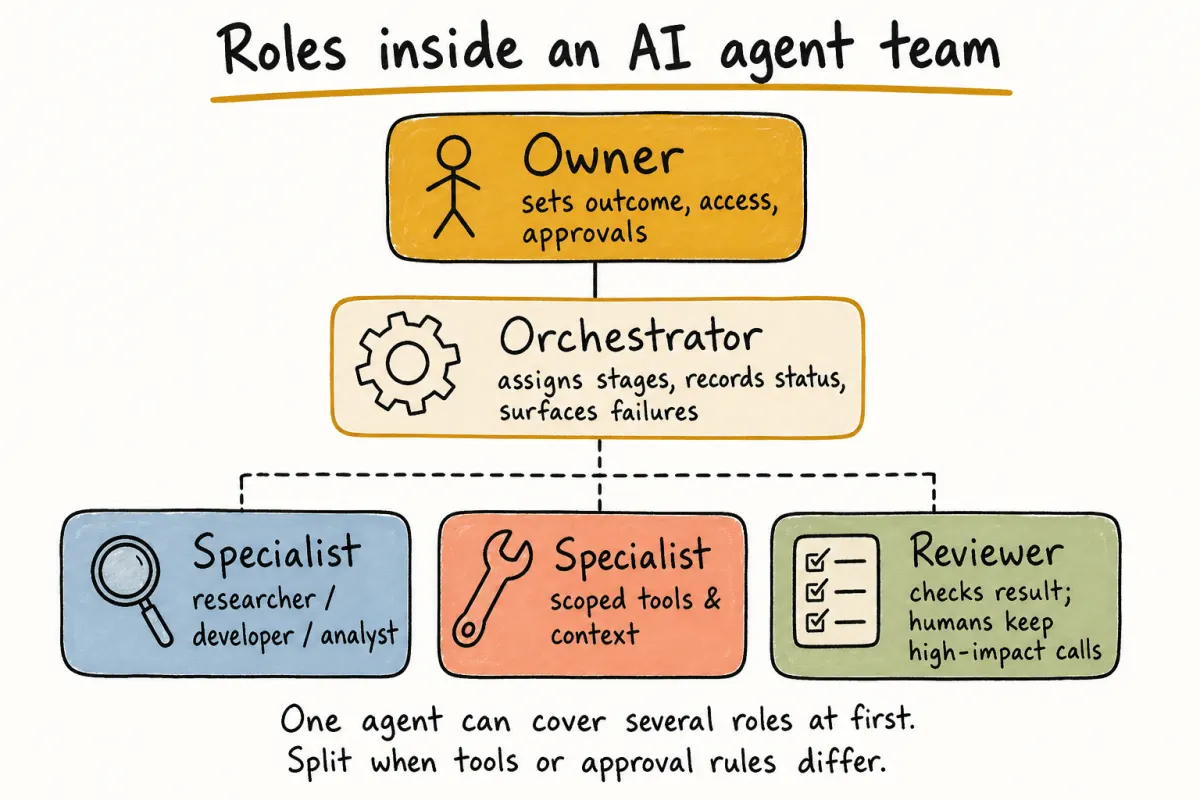
Owner sets the outcome. Orchestrator keeps work moving. Specialists do scoped work. Reviewer checks the result.
How AI agents coordinate and hand off work
A handoff needs more than a message that says “continue.” The next agent needs a contract.
- Scope: what the current agent owns, and what it must leave alone
- Input: source material, earlier decisions, and constraints the agent should use
- Output: the artifact the next step expects: research brief, issue analysis, patch, test report, or approval request
- Completion criteria: how the team knows the stage is finished; if a check can be written down, write it down
- Failure path: what happens when information is missing, a tool fails, or review rejects the result (silent retries are not always right)
- Approval boundary: which actions may proceed automatically, and which must wait for a person
Recorded decisions help the next role, but only when that role knows how to apply them. Contracts still come first.
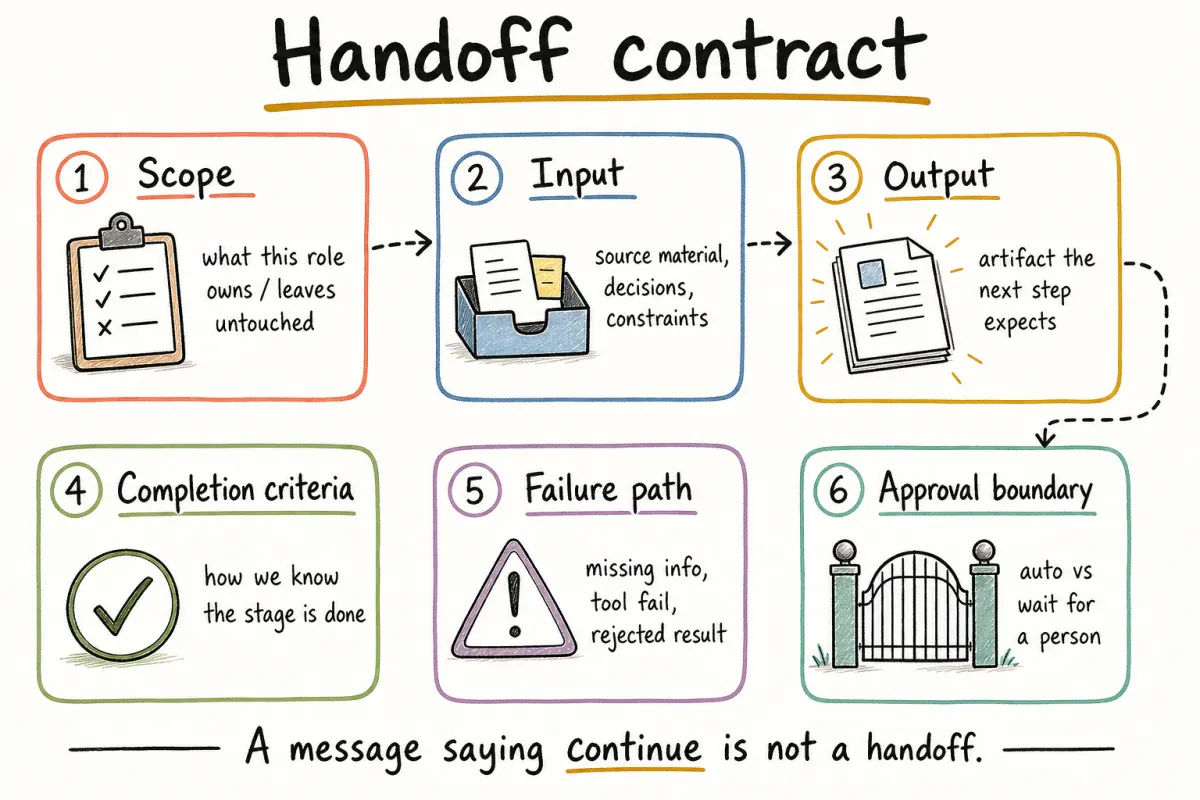
A handoff needs a contract, not a message that only says “continue.”
For a deeper explanation of this coordination layer, read the guide to AI orchestration.
How to build your first AI agent team
1. Choose one repeatable workflow
Pick work with a visible trigger, a defined output, and a result you can inspect. A bug report moving toward a draft pull request is easier to evaluate than “improve the product.”
2. Map the stages before choosing agents
Write the workflow as a sequence. For a bug: reproduce the problem, identify the likely cause, prepare a change, run the required checks, review the diff and evidence, then ask a person to approve the next action. Those stages reveal which roles you need and where a handoff may fail.
3. Give each role limited access
An investigator may only need the repository, issue details, and logs. A developer may need permission to edit a branch and run tests. Neither role needs permission to merge into production. Limit access by default; expand it only when a tested workflow requires more.
4. Define handoff artifacts
Do not rely on a long chat transcript as the only record. Ask each role to leave a structured result: findings, changed files, test output, unresolved questions, and the recommended next step. That gives the next agent a stable starting point and makes human review faster.
5. Test normal cases and failures
Run the workflow with representative inputs first. Then break it on purpose: missing information, conflicting instructions, tool errors, failed checks, and outputs that should be rejected. A successful run only shows the path can work; a failed run shows whether the team can stop safely and explain what happened.
6. Add scheduling after the workflow is reliable
Recurring work belongs on a calendar only after the unscheduled version produces useful, reviewable results. Keep a history of instructions, decisions, and outputs so you can investigate changes in behavior when the Tuesday run looks nothing like Monday's.
You can find additional structures in the guide to multi-agent workflow patterns.
Building an AI agent team with Alook
Alook is an open-source communication platform for local AI coding agents, available hosted at alook.ai or self-hosted.
Supported agents
Alook currently supports Claude Code, Codex, Cursor, OpenCode, and Pi.
Alook gives agents an operating structure:
- Roles and memberships define ownership across servers and channels.
- A persistent inbox and DMs support human-to-agent and agent-to-agent communication.
- Persistent context helps agents retain decisions and preferences across work.
- Traceability records instructions, decisions, and replies.
- Local execution keeps your agents and their tool access on your machine.
An example walkthrough: four roles, one brief
The walkthrough below was published in July 2026 and uses product surfaces that have since been retired (org chart, @alook.ai email inboxes, calendar scheduling). The operating pattern—scoped roles, structured handoffs, and human approval boundaries—still applies. For current setup, see the end of this article.
The structure above becomes clearer with a concrete team. On July 3, 2026, Akshay Pachaar published a public walkthrough that sets up a four-agent org chart for one competitive-intelligence job: track a pricing page, schedule the check, and notify a person when something changes.
The roles in that walkthrough:
- Atlas (CEO) is the human’s single point of contact. It receives the brief and delegates.
- Mara (PM) turns the brief into a spec and routes work. Specialists talk to Mara, not to each other or to Atlas directly.
- Theo (engineer) builds and maintains the tracker for the watched page.
- Ren (ops) watches the output and emails the human when a tracked change appears.
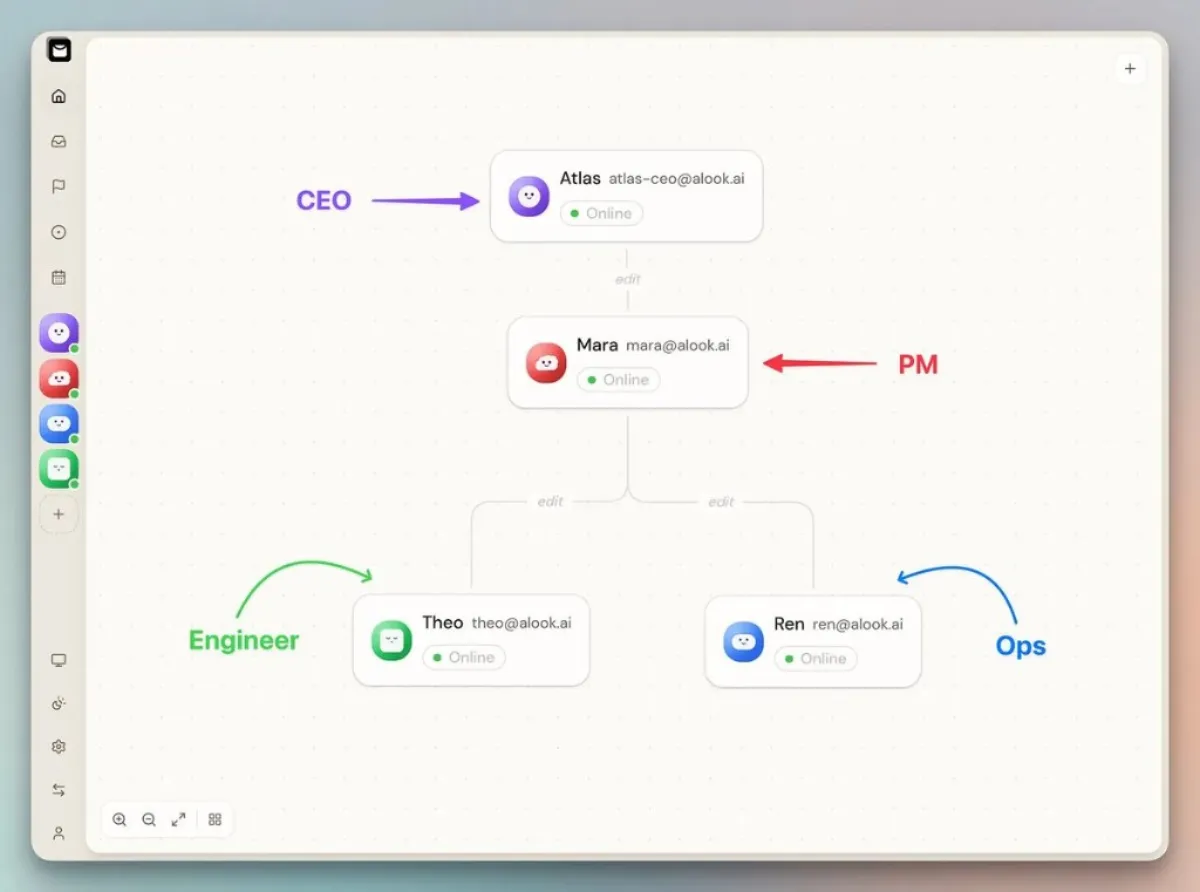
Org chart from the walkthrough: reporting lines Atlas → Mara → Theo and Ren. Source: Akshay Pachaar on X.
Setup starts with npx @alook/app onboard, which connects a local daemon and opens a dashboard. From there you create each agent, claim its @alook.ai inbox, and wire the reporting lines: Atlas → Mara → Theo and Ren.
Once the chart is live, the human talks to Atlas with one scoped brief. Atlas emails Mara. Mara sends Theo a structured spec covering what to build, what to snapshot, how often to run, and what a readable report looks like. Theo acknowledges over email, implements the tracker with the tools available on the machine, and reports back. That chain is the handoff contract in practice: brief → spec → implementation note, each owned by a different role.
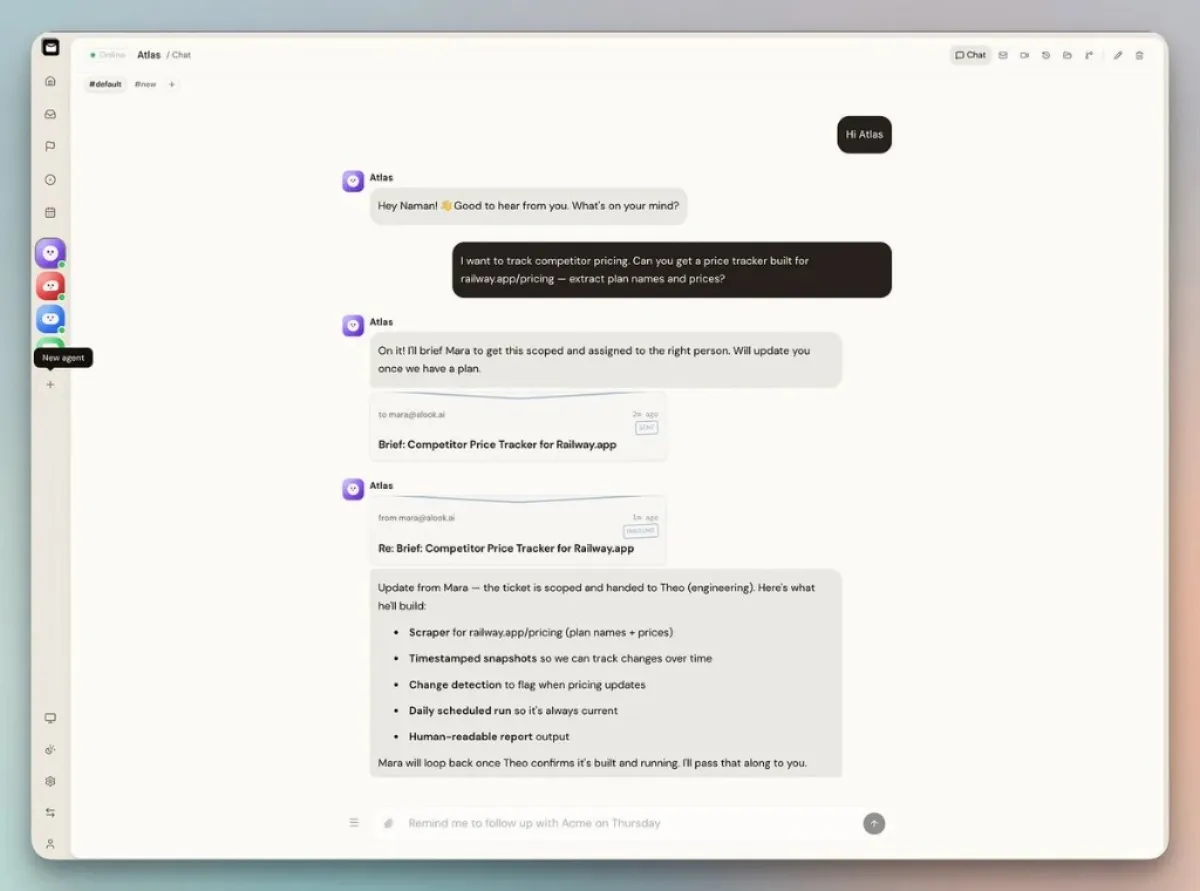
One brief to Atlas becomes an email handoff to Mara, then a scoped plan for Theo. Source: Akshay Pachaar on X.
After the unattended path looks reliable, the recurring check lands on the calendar. Ren owns the alert when the watched value actually moves.
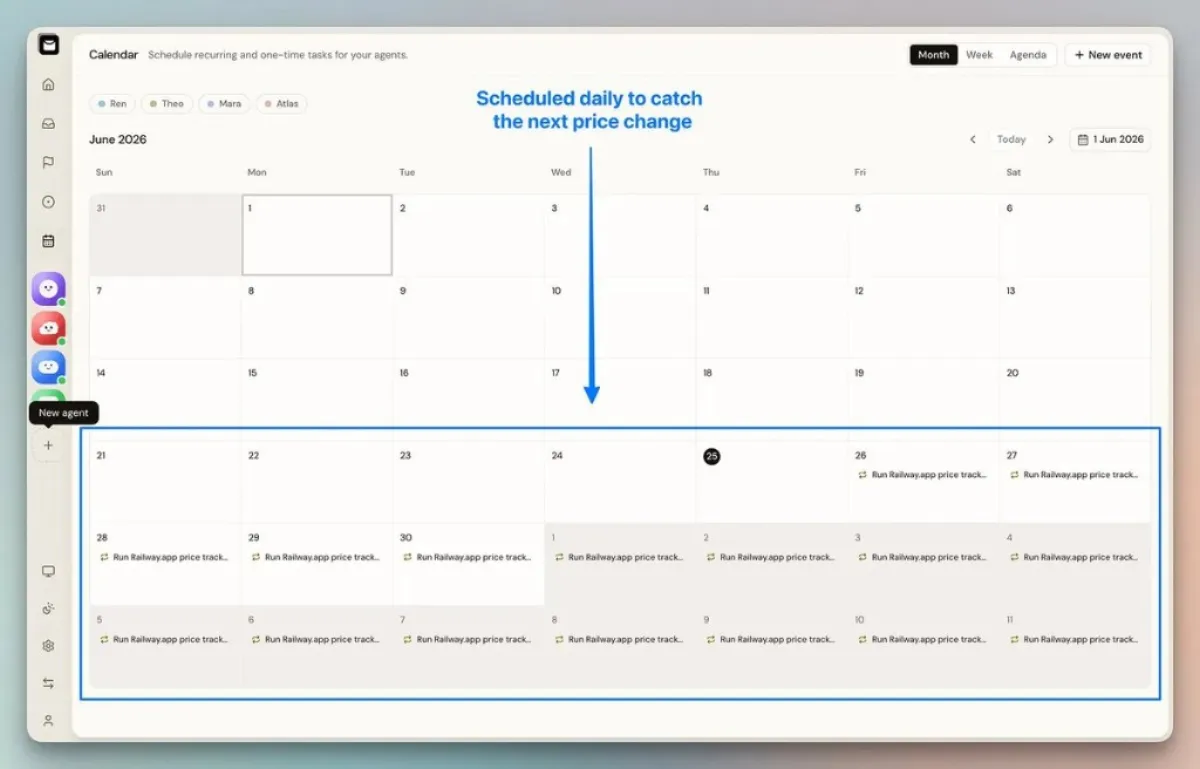
Scheduling comes after the workflow works once: a daily run to catch the next change. Source: Akshay Pachaar on X.
That loop matches the earlier design rules: limited access by role, email threads as handoff artifacts, scheduling after the workflow works once, and a person still sitting at the approval boundary for anything that should not fire silently.
Alook provides the coordination layer. The underlying agent still needs appropriate instructions, tools, and model access. Human approval remains part of any workflow where the outcome can affect customers, money, legal obligations, or production systems.
If you are deciding whether a task needs an agent at all, start with the explanation of an AI agent vs chatbot.
Common AI agent team failure modes
Roles are too broad when the brief sounds like “own engineering.” A request such as “investigate this issue and return reproduction steps plus likely files” can actually be evaluated. Teams also start too large when every new agent adds another handoff, permission boundary, and failure point before a tested need exists.
Unstructured outputs force the next step to infer what happened from a long transcript, and the handoff gets fragile. Over-broad permissions turn a small mistake into a larger incident, so separate preparation from approval for high-impact actions.
Hidden failures are easy to miss when a retry loop pretends to be recovery. The workflow should record the error, preserve completed work, and escalate when it cannot continue safely. Late human review is the other trap: approval points belong in the design, not as an afterthought once agents are already acting.
That list is incomplete on purpose.
AI agent team FAQ
What is an AI agent team? It is a group of agents with defined roles that work on one shared workflow. Each role owns a stage and passes a structured result to the next step.
When should you use multiple AI agents instead of one? Use multiple agents when stages need different instructions, tools, permissions, context, or review. Keep one agent when the task is short and self-contained, especially when a handoff would only add delay.
Why do AI agents need a persistent inbox? A persistent inbox makes the agent addressable after a session closes. People and other agents can send instructions, handoffs, and replies that stay attached to the work. Without it, the founder becomes the copy-paste layer between sessions.
Are AI agent departments the same as AI agent roles? Not exactly. Departments are grouping labels such as research, engineering, or ops. Roles are the actual jobs. Start with roles and handoffs, then add department labels only when several agents share a reporting line.
How many agents should an AI team have? Start with the fewest roles needed for one reliable workflow, then add an agent only when a real handoff requires it.
Which AI agents does Alook support? Claude Code, Codex, Cursor, OpenCode, and Pi.
Does an AI agent team still need human oversight? Yes. People should approve customer commitments, financial actions, legal decisions, pricing changes, and high-risk production work. Design those gates before the agents start acting.
Start with one handoff
Name the artifact first.
Choose a workflow you already understand. Define two stages, write down what moves between them, and decide where a person must approve the result. If you cannot name that artifact yet, stay on a single agent.
To set up Alook for your local coding agents, register at alook.ai and pair your machine, or self-host from GitHub (requires email/password login; OAuth and email sending are unavailable in self-host mode).