Personal agents vs coding agents: Do you need both?
Foundations & team designYour current setup may be enough. If Claude Code or Codex already handles the work you want to delegate, check what Grok Bot or Meta Muse would change. Add another product when a specific feature solves a recurring problem, such as keeping track of ongoing requests or reviewing pending actions.
Check what you would gain before taking on another setup to maintain.
Personal agents vs coding agents: what do the names mean?
An agent can use tools and take several steps toward a task. For example, it can read permitted messages and produce a file for you to review.
A personal agent is organized around your background, preferences and ongoing responsibilities, including work and business tasks. For instance, you might ask Grok Bot or Meta Muse to prepare a recurring customer-feedback brief from permitted sources and bring the findings back for review.
A coding agent starts with a software project and its tools. Claude Code, Codex, Cursor and OpenCode work with project files and commands. You might ask one to investigate a reported bug, propose a change and return test evidence. You review the result in the context of that project.
The capabilities overlap: Claude Code can prepare the feedback brief too, and Muse can write code. The labels describe the products' main focus; your task determines which configuration fits.
Can Claude Code or Codex handle personal tasks?
Yes, with access to the required information and tools. Claude Code or Codex can research a topic, read customer messages and write a brief. A weekly feedback summary is a useful example: first check whether the source messages are accessible through your current connections.
- Claude Code can connect through MCP to external sources such as Google Drive, Jira and Slack. Claude Code documentation
- Codex CLI supports plugins and MCP tools, which can extend the work you do in the terminal. Codex CLI documentation
- Cursor can use MCP services such as Linear or Notion. Cursor MCP documentation
- OpenCode provides file and command tools and supports custom tools and MCP servers. OpenCode tools
Test your actual connection. MCP support by itself does not mean that a product can access every service or account.
Background work is available here too. Codex Cloud runs tasks in configured remote repository environments, while Claude Code routines support scheduled and triggered work. Claude's routines remain a research preview with access and execution conditions. Codex Cloud, Claude Code routines
Compare the specific setup you would use. Check whether the feature belongs to a desktop app, a cloud service or a CLI; their configurations differ.
Why add Grok Bot or Meta Muse to Claude Code or Codex?
Consider Grok Bot or Muse when their task-management interface or supplied environment addresses a problem you still have. For the weekly brief, that could mean seeing which requests remain open and where your approval is needed.
Muse puts ongoing responsibilities in a Goals view. You can also inspect activity and permission history, use structured approval controls, and read or edit its memory files. If you lose track of several requests, try following one through these views before moving more work into Muse. Muse product design
Muse Goals: an official product example
Scroll sideways if needed, or open the full image.
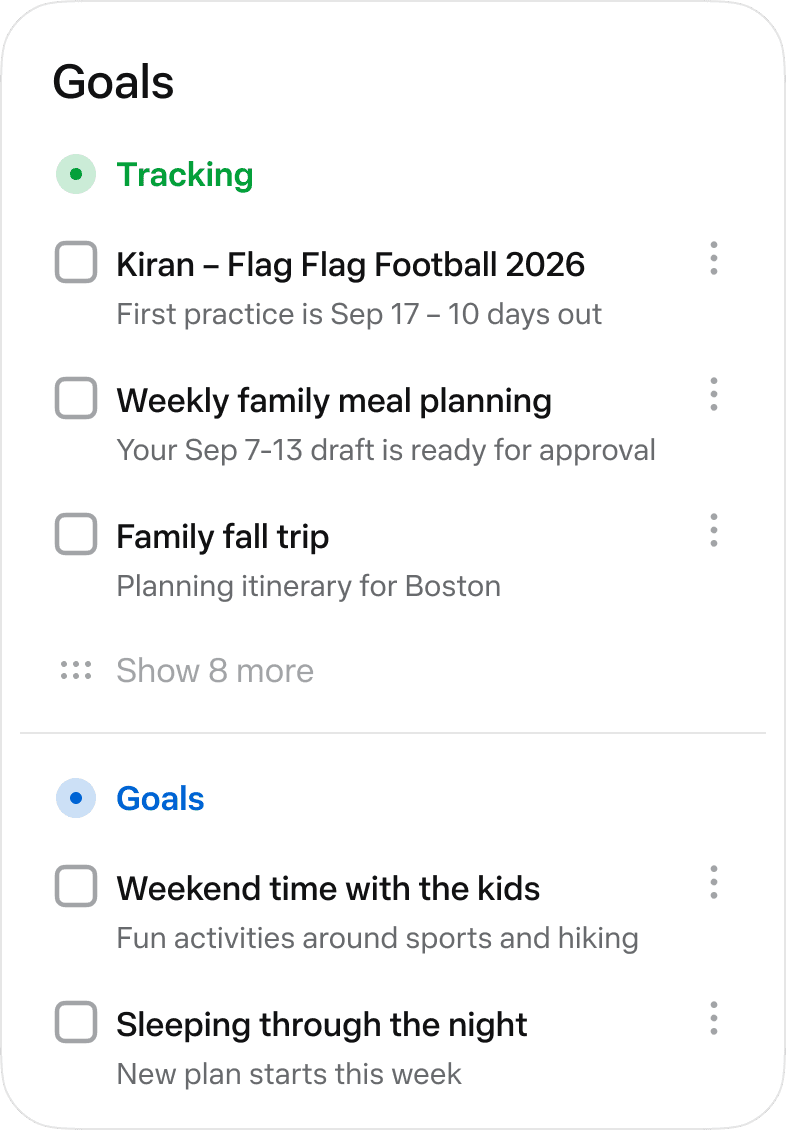
For the feedback brief, give Muse access to the relevant information and explain what counts as a useful finding. Check the sources. Confirm that the brief follows your rules. The interface helps you inspect the task; its presence alone cannot establish time savings or accuracy.
Grok Bot supplies a persistent cloud computer with a browser, files and a terminal. Named bots can take on jobs and join group conversations. Under your account, they share the computer and its logged-in sessions. Each bot keeps its own conversation context and memory. Grok Bot overview
That may suit someone who wants to organize several responsibilities through those named bots. You still grant access, define the job and respond when a website requires a human step. For a recurring brief, Grok Bot also documents skills and routines with schedules or event triggers. Grok Bot routines
If your only problem is keeping a task running remotely, compare the remote options in Codex or Claude Code first. As of October 19, 2026, Cursor Cloud Agents also provide remote environments and can use configured MCP services. Cursor Cloud capabilities
Name the operation or maintenance you expect the new product to remove. You might find pending work easier to inspect in Muse's goal view, or prefer assigning responsibilities through Grok Bot's named conversations. Try that part of your workflow and see whether it helps.
How can I check whether my current setup is enough?
Run a small version of the feedback brief in Claude Code, Codex, Cursor or OpenCode, whichever you already use. Start with a limited set of messages you are allowed to share:
Review this week's customer-feedback messages. Link each finding to its source. Separate bug reports from requests that need clarification. List any supplied reproduction steps and mark unverified reports as unverified. Prepare a brief for me to review. Do not send replies or change code.
This is a suggested trial, not a comparison we have run. Inspect the resulting brief before trying to repeat the task. You can test your current connections without subscribing to every product.
| Check | Evidence to look for |
|---|---|
| It read the intended material | The brief links to accessible source messages and covers the requested period |
| It understood your rules | Bug reports and unclear requests are separated; supplied reproduction steps and verification status are visible |
| You can correct the result | You can inspect the brief, change the instructions and review another attempt |
| The next run has a defined path | You know what starts it, where it executes and which settings apply |
| Someone can recover a failed run | A named person can notice an expired login or missing output and restart the work |
A good brief today still leaves next Friday's run to check. Verify what will start it and where you will see the result. If missing source material made the first brief poor, changing products may leave that problem unresolved.
Write down the missing step. For instance, look for a control in Muse, Grok Bot or your existing setup that clearly shows which requests still need approval.
Should I keep Claude Code or Codex, switch, or use both?
Keep Claude Code or Codex when the task works and you can maintain and review it. If a specific feature in Grok Bot or Muse addresses a recurring problem, try that feature before switching. Your existing setup matters more than your job title.
| Your situation | What to try first |
|---|---|
| Claude Code or Codex already produces the brief through working connections | Keep that workflow and fix any remaining gap directly |
| You want Muse's goal and approval interface, or Grok Bot's way of organizing named bots | Try one bounded responsibility there before moving more work |
| Your Cursor project already contains the relevant tools and review process | Test the task in that project before rebuilding the setup elsewhere |
| OpenCode already has the tools and permissions you need | Test that configuration and decide who will maintain it |
| You only need occasional answers | Check whether your existing chat tool is sufficient |
A person without development experience may prefer a particular interface, but the label "personal" does not make every task easy to supervise. If you cannot assess a code change, arrange technical review. Likewise, a developer may prefer Muse for tracking personal responsibilities. There is no rule that developers should use one category and everyone else the other.
If the brief leads to software work, you can hand an approved finding to the project where Claude Code, Codex, Cursor or OpenCode is already configured:
- Review the source-linked feedback and select a bug report to investigate.
- Give the project the observed behavior, expected behavior and any supplied reproduction steps. Ask it to verify the report before proposing a fix.
- Review the proposed patch and test evidence before deciding whether to merge or release it.
A suggested manual handoff
Scroll sideways if needed, or open the full image.
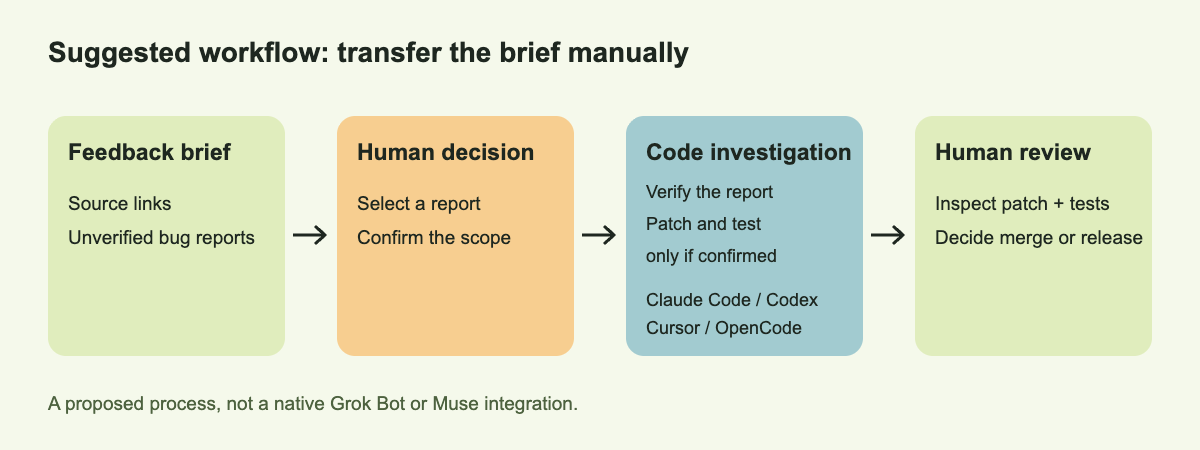
This is a suggested manual handoff, not a verified native integration with Grok Bot or Muse. If one tool handles the full task well, you do not need to split it merely to use both.
If you decide to add a personal-agent product, compare Grok Bot, Meta Muse and Manus Cue for their different tools, approval flows and ways of organizing work.
What if coworkers need to review or continue the work?
Give the relevant people access to the brief and a place to discuss the proposed fix. The colleague prioritizing a reported bug may need answers before anyone changes the code.
Alook is an option when you want coworkers and their bots to participate while retaining supported runtimes such as Claude Code or Codex. They can discuss the evidence and ask follow-up questions in a shared conversation they can access. Alook
Each participant keeps their own tool permissions. Alook does not create a native connection to Grok Bot or Muse. A runtime executing on your computer still needs that machine online.
For the next feedback review, identify the step you cannot complete comfortably in your current setup. Check that step in the product you are considering, including who will maintain access and review the result.