Claude Code Memory: Persistent Memory Across Sessions
Coding agents across runtimes & repos
Claude Code has native persistent memory. Start with its built-in notes before deciding whether you need a plugin. Run the three-step check below to confirm memory works for your project.
Check Claude Code memory in three steps
- Save a harmless fact. In a disposable project, ask Claude to remember a fictional review label, such as
OPAL-742, using auto memory. Ask it to leave repository instructions unchanged. - Inspect the files. Open
/memory, then the auto memory folder. Check the saved note and its index entry. A promise to remember is not proof of a successful write. - Ask in a fresh session. Exit and launch
claudeagain in the same project, without resume flags. Ask “What review label should this demo project use?” Keep the label itself out of this question.
Compare the answer with the saved files and any visible read record. If you only have the answer, you have checked recall, but have not independently confirmed its loading path.
What does Claude Code remember between sessions?
Claude Code can carry project instructions and saved auto-memory notes into new sessions. Resuming a session continues an earlier conversation. Use the carrier that matches what you need to preserve.
| Carrier | Use it for | What to check |
|---|---|---|
| Instruction files | Rules the project expects an agent to follow | Which files this client selected |
| Auto memory | Selected notes that remain useful later | Whether the note exists and is available when needed |
| Session history and resume | Continuing an earlier conversation | Whether you reopened the intended session |
CLAUDE.md and conditional AGENTS.md loading
Put a standing requirement in an instruction file. A note about an earlier experiment belongs elsewhere if it is likely to change.
The current official memory documentation makes AGENTS.md loading conditional: direct support requires v2.1.277 or later, and local CLAUDE.md or CLAUDE.local.md files affect the default choice. /config can select both; unsupported sessions can import AGENTS.md through CLAUDE.md. Check the selected files rather than assuming that every instruction file is loaded.
Where is Claude Code auto memory stored?
The documented default location is ~/.claude/projects/<project>/memory/, with a MEMORY.md index and separate topic notes. Use /memory to confirm the location for your session; custom configuration can change it. Our experiment used a separate configuration directory, so its config/projects/... path below is a test location.
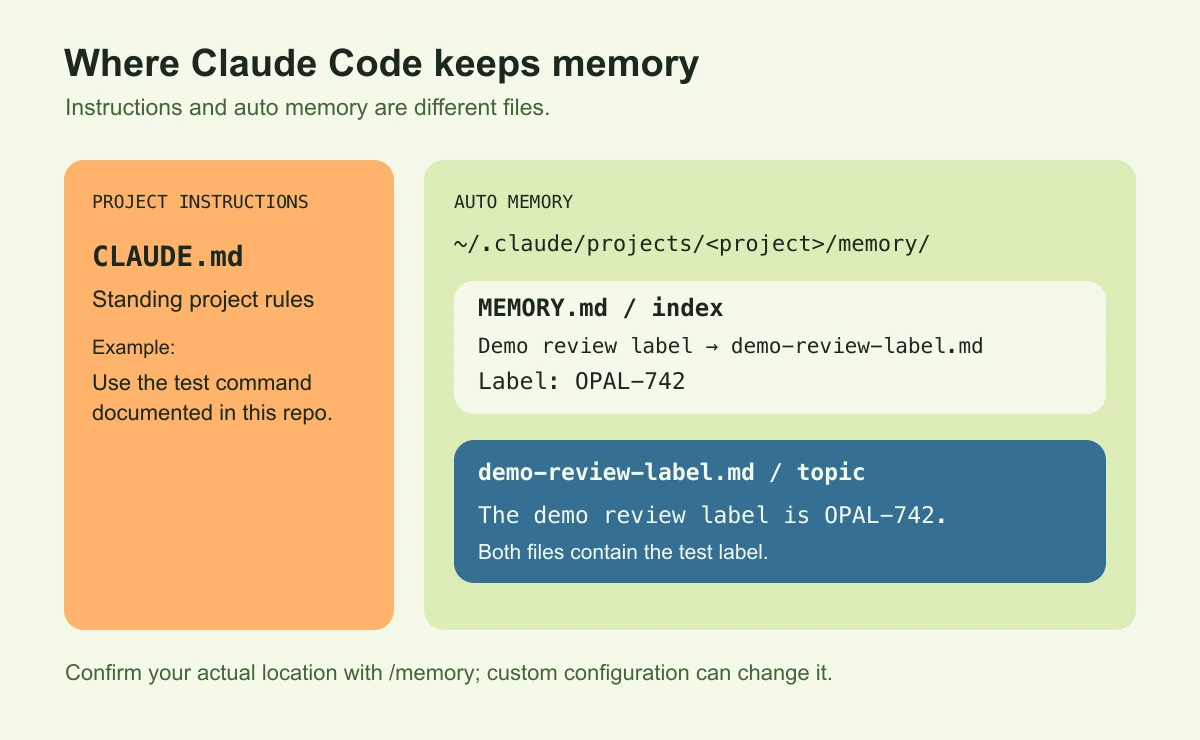
Memory-file schematic. Both the index and topic note contain the test label; custom configuration can change the memory location.
Session history and resume
Use resume when you want to continue the earlier conversation itself. The session guide documents claude --continue for the most recent session in the current directory and claude --resume for choosing another.
For a cross-session memory check, start a separate session so the earlier conversation does not supply the answer.
Verify memory in a new Claude Code session
Open /memory to check that auto memory is enabled, save a test note, then ask for it in a new session. Inspect the saved files and available read records to separate a successful save from successful recall.
Use the interactive memory controls
The following route is based on the documented /memory controls, checked on October 22, 2026. Our hands-on test used CLI calls; the interactive steps are documentation-based and were not tested here.
Run claude --version and record it. Open Claude Code from your terminal in the intended project, then:
- Enter
/memoryand check the auto memory toggle. If it is off, enable it in a directly launched terminal session before testing. - Select the option to open the auto memory folder. After your save request, inspect the note and
MEMORY.md; compare the actual path and contents with what Claude reported. - Use
/contextto check loaded instruction files. The instruction-file list answers a different question from whether a topic note was read. - Exit, start
claudeagain from the same project, and ask the recall question. Inspect whatever read activity your client exposes.
If the toggle cannot be enabled here, restart directly from your terminal. Avoid selecting a nonexistent instruction-file entry just to inspect it: /memory can create that file.
What we tested with the CLI
We ran the save, recall, correction and removal checks on macOS with Claude Code 2.1.304, the stable release returned by the official download endpoint on October 21, 2026.
An empty Git project and separate CLAUDE_CONFIG_DIR kept the test notes apart from daily work. We used default memory placement, with no autoMemoryDirectory or autoMemoryEnabled override. Tools were limited to Read, Write and Edit, with project/local settings sources and a strict empty MCP configuration. These controls narrowed storage and tool access; machine-level instruction ancestry was not fully isolated.
Each -p call started a separate conversation without --continue or --resume. The CLI reference documents these output and session controls. We inspected successful tool results and file snapshots, rather than treating Claude's explanation as an execution log.
Claude wrote demo-review-label.md and MEMORY.md under config/projects/<encoded-project>/memory/. Its index entry was:
- [Demo review label](demo-review-label.md) — demo review label is OPAL-742The next call returned OPAL-742 and recorded a successful read of the topic file. Both files contained the answer, so this does not prove that the topic was its only source. It does establish that the topic was read. We made no manual index repair in this run.
Separate observed recall from an unverified loading path
Our results were:
| Test state | Direct observation | Fresh-session answer |
|---|---|---|
| 2.1.304, default memory placement | Claude wrote topic and index; next call read topic | OPAL-742 |
| Saved preference corrected through Claude | File changes inspected; next call checked separately | CEDAR-915 |
| Disposable note and index entry removed | Author intervention, followed by a separate recall | UNKNOWN |
| Earlier 2.1.185, custom memory directory | Topic created without index; first recall failed | UNKNOWN |
The earlier failure is a troubleshooting example for that setup, not the observed default behavior of 2.1.304. This is one project's save/recall/correction exercise, rather than a recall-rate benchmark. Interactive controls, other machines and subagents were outside the test.
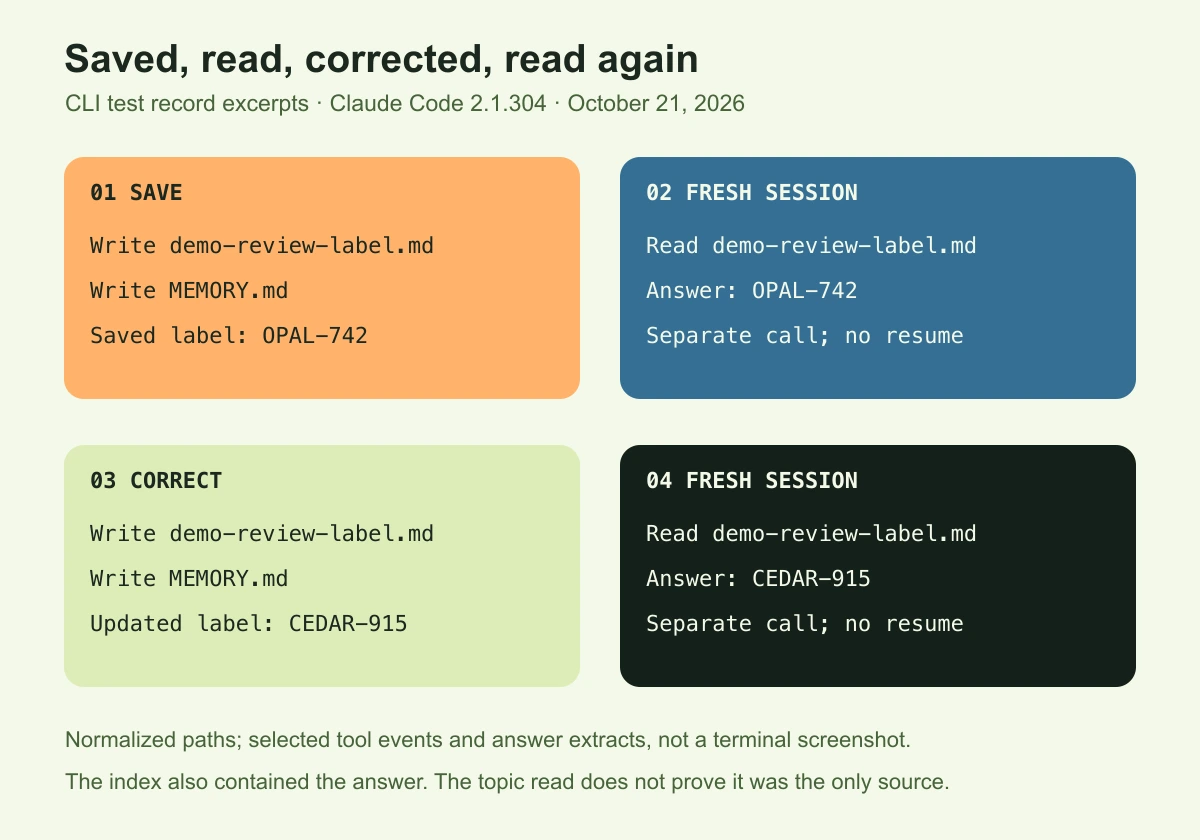
CLI test-record excerpts, Claude Code 2.1.304, October 21, 2026. Paths are normalized; this is a layout of selected tool events and answers, not a terminal screenshot. The index also contained the answer, so the topic read does not prove it was the only source. See the complete sanitized test record.
Fix Claude Code memory that is not working
Check the save destination, index entry, project scope and available read records. Fix the first failed step, then repeat the recall check in a fresh session; if an old value persists, look for another copy or conflicting instruction.
Saved files are not being loaded
Open the intended memory location and compare it with the file your earlier save actually created. Look for a missing index pointer, a different project directory, or a settings mismatch before adding another memory tool.
| Symptom | First check | Useful evidence |
|---|---|---|
| Save was reported, but no note is found | Actual write result and destination | File exists with the intended content |
| Note exists, but recall fails | Index, project scope, and available read records | Missing pointer, wrong path, or a read error |
| Correct note was read, but answer is wrong | Other instructions and the current question | Conflicting input or an unsupported conclusion |
An edited or deleted note still appears
Ask Claude to retire the old value and update the saved preference. Then inspect every changed memory file and ask the same recall question in a new conversation. Our test replaced OPAL-742 with CEDAR-915: successful Write events rewrote the topic and index, and the next call read the topic and answered with the new value.
For the removal check, we archived the disposable topic outside the memory directory and removed its index pointer. The next conversation answered UNKNOWN. This was a manual file-and-index change, not a test of a delete button or a privacy-erasure guarantee.
If an old value still appears, inspect the active conversation, other files and the question itself for another copy.
Do you need a Claude Code memory plugin?
Keep native memory if your task is to retain a few project preferences and the save/recall check works. Consider an extension only for a specific missing capability, such as searching a large archive or retrieving notes from another client. Before installing it, check what it captures, where it stores data and who can retrieve it; our test did not compare plugins.
Alook provides shared discussions where you can post a changed decision and its source for the people and bots doing the work. That handoff does not synchronize Claude Code's private memory; see sharing context between agents.
When switching runtimes, carry the approved decision and the next verification step explicitly. The guide to keeping context across coding agent sessions covers those portable records. Check the destination tool's memory setup before expecting it to recall them.
Claude Code memory FAQs
Why does memory work in one project but not another?
Compare the actual save destination with the memory folder shown in the second project before changing the note. Our experiment used one Git project and one configuration directory; it did not test transfer to another repository or machine.
Should I add an index entry when recall fails?
Check first. Our 2.1.304 run created its own index. The older 2.1.185 custom-directory run needed a manual pointer before recall succeeded. That earlier repair is evidence for that setup, not a universal installation step.
Which should I correct: memory or project instructions?
Correct the source that owns the fact. A standing project rule belongs in maintained instructions; a retired preference needs its stale memory updated. If both mention it, inspect both and repeat the fresh-session check. Adding another contradictory note leaves the conflict in place.
Does compaction delete saved memory files?
Compaction reduces conversation context. A missing answer does not prove a saved file was deleted. Inspect the file and check whether the session can access it.
Can subagents use the main session's auto memory?
Do not assume they inherit it. The official subagent guide describes separate memory configuration and context behavior; forks have different inheritance behavior. Check the agent type and version. For the broader distinction, see Claude Code subagents and independent agents.