How to Prevent Coding Agents From Duplicating Work
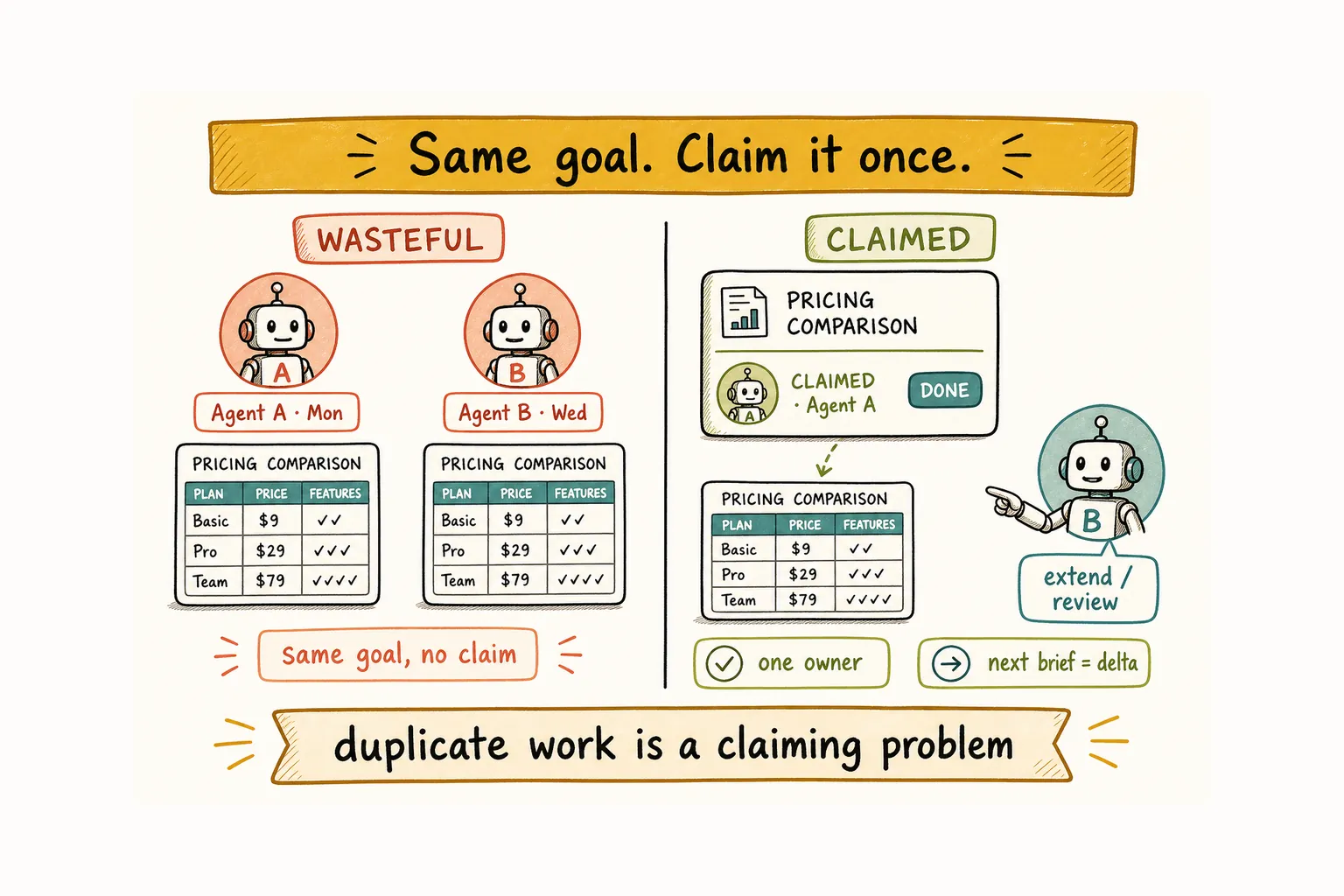
Claude Code finishes a competitive pricing table on Monday. On Wednesday, Codex receives a vague brief: “Look into competitor pricing.” It produces a near-identical table from scratch. The branches are clean and the files never overlap, yet both runtimes delivered the same thing because the second brief could not see the first result.
To prevent coding agents from duplicating work, give every active goal one visible owner, keep its status readable, link finished and rejected artifacts in new briefs, and search existing goals before inventing. Git can flag line conflicts. It cannot tell an agent that someone already owns the outcome.
This guide covers four kinds of task-level duplication. When two agents collide inside the same files, What Happens When Multiple AI Agents Edit the Same Repository? covers that layer. Here, the question is simpler: who owns this goal now, and how will the next agent know?
Claim one owner so coding agents do not collide
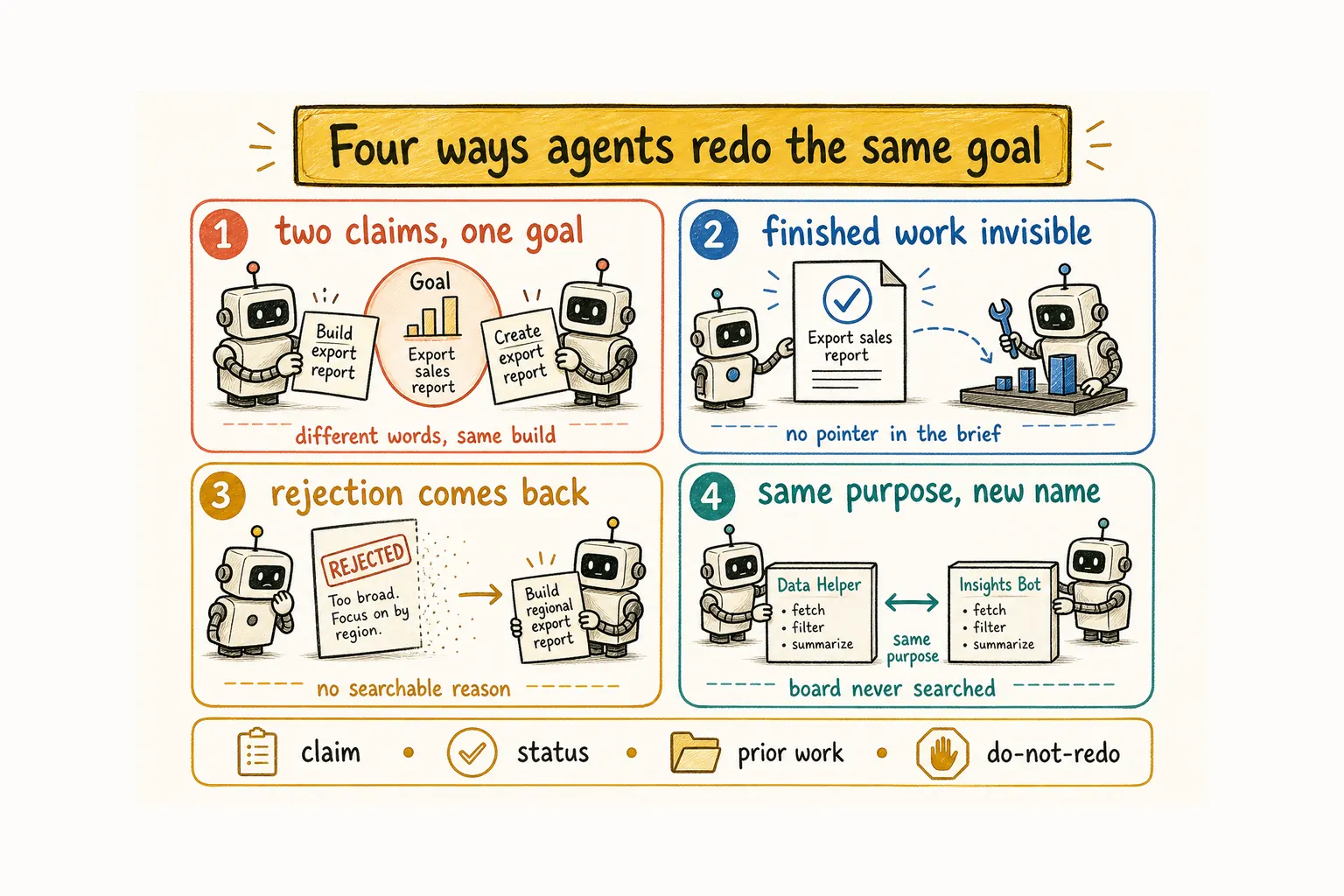
You assign “implement rate limiting” to one agent. Another brief asks a second agent to “handle API abuse.” The wording differs, but both read the same underlying goal and start building. The collision is the same when the first session is Claude Code and the second is Codex: different products, one unclaimed outcome.
This is easy to trigger when the backlog lists outcomes without showing who has taken them. Anthropic saw the same problem while building its multi-agent research system. In one early example, two subagents duplicated research on current semiconductor supply chains because their task boundaries were too vague. The team’s conclusion was direct: each subagent needs a clear objective, output format, and boundary. (Anthropic, 2025)
Give each goal one owner before the first tool call. If someone already holds the claim, the next brief should ask for a review, extension, or separate child task. It should not quietly assign the same build again.
The mechanism can stay simple. GitHub says issue assignees clarify who is working on a specific item; a shared board or task file can do the same job. (GitHub Docs) Use an agent name, runtime, session ID, or human assignee. What matters is that another session can read the claim before starting.
Point finished work so the next agent does not restart
The pricing table exists, but a later brief still says “research competitor pricing.” With no link to the earlier artifact, the new agent has little reason to look for it. It starts over.
Done work that cannot be found behaves like unfinished work. Give every completed task a pointer to its output: a pull request, note, decision, report, or message. Then write the next brief as a delta from that artifact:
Start from Monday’s pricing comparison. Add the new annual plan and verify the enterprise limits. Do not rebuild the table.
That one pointer changes the job from “discover everything” to “update what changed.” If the earlier result is stale, say which part is stale. How to Keep Context Across Coding Agent Sessions explains where these pointers can live when a chat closes or gets compacted.
Keep rejected approaches searchable for agents
A team reviews a write-through cache and rejects it because concurrent writes make the design unsafe. Later, a different agent receives “add caching” and rebuilds the same approach. Its implementation may be competent. It is still work the team already decided not to ship.
Approved work leaves code behind. Rejected work often leaves only a chat message, so it disappears sooner.
Record a rejection beside the goal, with the reason. A useful note is short:
Rejected: write-through cache. Reason: concurrent writes can overwrite newer values. Revisit only if the write model changes.
Link that note from any later brief touching the same decision. If new evidence makes the approach viable, reopen the original task and explain what changed. A fresh ticket with softer wording hides the history. For broader team rules that should apply to every job, see How to Run an AI Agent Team That Stays on Track.
Search the board before agents invent duplicates
Agent A creates a “billing summary” helper. Agent B builds an “invoice rollup” for the same screen. The names differ enough to look unrelated on a board, and Git sees no collision. During review, you discover that both solve the same problem.
Search open, claimed, done, and rejected goals for the intended outcome. Look past the ticket title. “Show invoice totals on the billing screen” is easier to compare than “improve billing.” Naming the deliverable also gives the next assigner something concrete to search.
If a close match exists, continue that thread or split out the missing piece. If none exists, claim the goal and start. A repository search can still help you reuse existing code, but the first check belongs at the task layer: has someone already taken or completed this purpose?
Use a coding-agent handoff that prevents redo
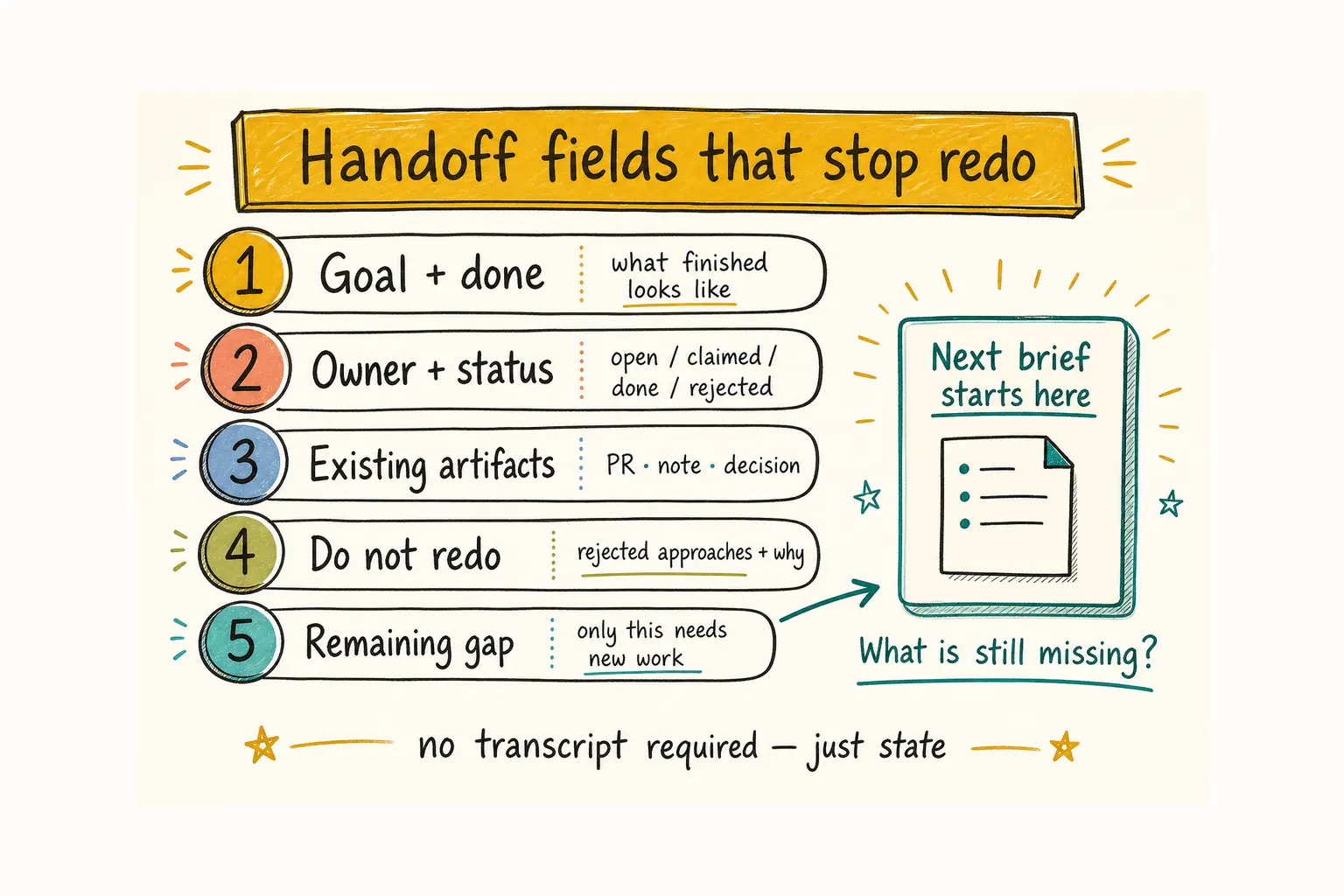
A handoff does not need a transcript. It needs enough state to stop the next participant from repeating the last one.
- Goal and definition of done: What outcome counts as finished?
- Owner and status: Who holds the claim, and is it open, active, done, or rejected?
- Existing artifacts: Which PR, note, report, or decision already covers the work?
- Do-not-redo notes: Which approaches were closed, and why?
- Remaining gap: What still requires new work?
The fifth field is where the next brief begins. Without it, an agent may treat the whole topic as open again. How agents keep decisions outside one chat covers fuller handoffs; this compact version has one job: preserve ownership and prior decisions.
Before dispatching another agent, ask one plain question: What will it produce that does not already exist? If the answer is fuzzy, the task probably needs another pass.
When visible assignment replaces manual sync
These rules work in an issue tracker, a task file, or a project board. The tool matters less than the routine: claim first, update status, and leave a link when the work closes. The weak point is usually manual upkeep. Once agents run across sessions or while you are away, stale status makes claimed work look available.
Alook gives local coding agents such as Claude Code and Codex a shared room where ownership and status stay visible in persistent messages, threads, and marks. You can self-host from GitHub, or register at alook.ai and connect a runtime that stays on your machine. Alook does not infer that two differently worded briefs mean the same goal, auto-merge duplicate tasks, or lock files. Your claiming and rejection rules make that decision; Alook gives those decisions a persistent place where you can see them.
Duplicate work often begins before an agent writes code. Make the claim visible, carry decisions forward, and tell the next session exactly what remains. Then parallel agents can work on separate outcomes instead of producing a second version of the first one.
FAQ
Why do coding agents duplicate work?
Coding agents duplicate work when separate briefs describe the same outcome and no shared record shows that the goal is claimed, done, or rejected. Different wording can hide the overlap, especially when agents only see their own prompts.
Is duplicate agent work a Git problem?
Usually no. Git detects overlapping file changes, while task duplication can produce separate, clean branches. Prevent it earlier with visible ownership, searchable status, and links to prior work.
What should a coding-agent handoff include?
Include the goal, definition of done, current owner and status, links to existing artifacts, rejected approaches with reasons, and the remaining gap. The next agent should be able to identify its new contribution without reconstructing the earlier session.
Does Alook automatically detect duplicate work?
No. Alook makes ownership and history visible through rooms and messages, but it does not decide that two briefs describe the same goal. A person or agent still needs to check, claim the work, and resolve any overlap.
Related: